Manage your phone messages quickly and easily with PhonePad!

PhonePad Use Case: Law Firms – Managing Client Consultations and Case Deadlines.

Use Case: Law Firms – Managing Client Consultations and Case Deadlines


Challenges

  • High Volume of Client Communication: Lawyers handle numerous cases simultaneously, making it challenging to track all client calls and follow-ups.
  • Manual Processes: Logging calls manually is time-consuming and prone to errors, which can lead to missed details or deadlines.
  • Compliance Obligations: Legal professionals must maintain accurate records of communication to meet ethical and legal standards.

How It Helps

PhonePad simplifies client communication management by automatically logging phone logevery call, including the client’s name, case details, and nature of the inquiry.

The integrated Appointment Calendar ensures that consultations, court dates, and internal team meetings are efficiently scheduled and tracked.


Benefits

  1. Centralized Call Management:

    • Easily log all client calls with time, date, and duration for complete and accurate records.
    • Organize communication by case or client, making retrieval fast and straightforward.
  2. Efficient Scheduling:

    • The Appointment Calendar enables attorneys and assistants to book consultations, court appearances, and deadlines without overlap.
    • Send reminders for key events, ensuring important dates are never missed.
  3. Improved Preparation:

    • Call notes and histories are accessible in seconds, allowing lawyers to quickly review past discussions before meetings.
    • Reduces time spent searching for information, enabling more focus on case strategy.
  4. Enhanced Client Satisfaction:

    • Timely responses and organized scheduling boost client confidence in the firm’s professionalism.
    • Reliable records reduce errors, building trust and improving client retention.

Example Scenario

An attorney, Jane Jefferson, receives a call from a client, Dave Green, about a critical development in their case. PhonePad logs the call, capturing the details of the issue.

The assistant uses the Appointment Calendar to schedule a follow-up consultation the next day.

During the meeting, the Jane quickly retrieves past call records and notes related to the case.

This streamlined process saves time, ensures the Dave’s concerns are addressed promptly, and enhances the Jane’s ability to provide effective representation.


 

PhonePad Use Case: Medical Practices – Managing Patient Follow-Ups

Use Case: Medical Practices – Managing Patient Follow-Ups


Challenges

  • Complex Appointment Coordination: Receptionists struggle to balance scheduling, cancellations, and follow-ups, leading to inefficiencies.
  • Miscommunication Risks: Misplaced call details or forgotten follow-ups can result in dissatisfied patients and missed care opportunities.
  • Privacy Concerns: Compliance with regulations like HIPAA requires secure handling of patient communication and scheduling data.

How It Helps

PhonePad simplifies patient communication management by securely logging all phone message padcalls, including inquiries about appointments, test results, and medication. The integrated Appointment Calendar organizes patient visits, physician schedules, and procedure bookings, ensuring smooth and compliant operations.


Benefits

  1. Streamlined Call Logging:

    • Securely logs all patient interactions with options for categorization (e.g., appointment requests, follow-ups).
    • Links call records to patient files, providing a complete communication history.
  2. Efficient Appointment Scheduling:

    • The Appointment Calendar enables real-time scheduling and updates, reducing double bookings or missed slots.
    • Prioritizes urgent cases by highlighting critical follow-ups.
  3. Improved Communication:

    • Ensures timely updates between patients and healthcare providers, enhancing trust and satisfaction.
    • Provides reminders for upcoming appointments, reducing no-shows.
  4. Compliance and Security:

    • Protects patient data with encrypted call logs and scheduling features, aligning with HIPAA standards.
    • Minimizes risks associated with handling sensitive health information.

Example Scenario

A patient calls to reschedule a check-up. PhonePad logs the details, capturing the patient’s reason and preferred date. The receptionist uses the Appointment Calendar to adjust the booking in real-time, ensuring the new appointment fits into the physician’s schedule without disrupting other bookings. The updated details are linked to the patient’s record, providing a clear and accessible history for future interactions. This seamless process keeps the patient happy and ensures compliance with privacy regulations.


PhonePad Version 5.86.0 Has Been Released.

We are pleased to announce the release of PhonePad 5.86.0.

Also included is Appointment Calendar Version 5.19.0

Changes in This Release

  • NEW: Appointment Calendar: Drag and drop appointments to change the start and end times, the date, and even the provider.
  • NEW: Address Book: Tabs can now be moved.
  • IMPROVED: Attachments are now forwarded for phone messages and memos.
  • IMPROVED: Added Reminder, Delete Reminder, and Manage Reminders to Tools menu.
  • IMPROVED: PhonePad Server now automatically detects IP Address changes while it’s running.
  • IMPROVED: Added a Reconnection Log, mainly for troubleshooting purposes.
  • CHANGED: Added Reminders to Tools menu.
  • FIXED: Appointment Calendar: A hidden error was occurring when adding appointments around 12 noon, using Standard time.
  • FIXED: The PhonePad loader program wasn’t automatically closing when PhonePad is launched.
  • FIXED: To Do List: issue with recurring tasks.
  • Miscellaneous improvements and fixes.

Important Information About MessageSender

This release is only compatible with MessageSender Version 6.25.0 or later.

Problems?

We’re human too.  We haven’t been replaced by some algorithm – yet. And we’re definitely not perfect.  Like most other humans, we can make mistakes.  So chances are you may come across something that’s not quite working right.  If you do find an error or a bug, please let us know and we’ll fix it as quickly as possible.

Installation Information

Please note: Server Updates must be installed on your Server or Host PC, not your workstation (unless your workstation is also the Host PC) – they cannot be installed directly on your workstations.  Make sure all users are logged out of PhonePad as the PhonePad Server will be stopped during the update and then restarted once it has completed.  Workstations will be automatically updated when PhonePad 5 Workstation is started on each workstation. Important: When downloading and installing an update from your My PhonePad account, make sure it’s actually the update and not the server setup program.

How Updates Work

Please read: You do not need to install every update between this one and the last update you installed.  PhonePad uses a smart update system that compares your current PhonePad system with what’s in the update, works out what changes are required, and then makes those changes.  So if you are a few versions behind don’t worry.  You can skip all of the updates in between and go straight to this update.

Updates and Anti-Virus Software

Depending on the anti-virus software you use, when you install a Server Update your AV software may class the updated software as a different program due to the change in binary signature.  If you experience speed or freezing issues after an update, you may need to reconfigure your AV software to stop real-time scanning of PhonePad.  This may need to be done on the both your Server or Host PC, and your workstations.

Digital Signatures

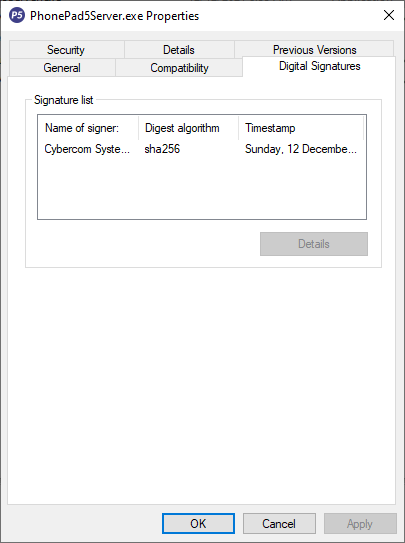
All PhonePad executables and DLLs are digitally signed for your protection.

You can confirm that a file is safe by right-clicking on it and selecting Properties from the popup menu, and then selecting the Digital Signatures tab.

Downloading the Update

You can download the update from your My PhonePad account.

If you are a current trial user you can download the update by logging in to My PhonePad Trial using the email address you used to start your trial.

Please contact Support if you have any problems or questions.

Installing Updates

If you’re unsure of how to install updates, please watch the video on this blog post.

You will need to have a current Update Plan to install this update.  If your Update Plan has expired, you will need to renew it before you can install this update.

Update Installation Service

If you would rather have the Server Update installed for you, you can arrange for us to remote connect and install it.  The cost is $37 and you can schedule a date and time here: https://www.cybercom-software.com/remote-server-update-assistance.htm .

Enhancing Senior Living with Accessible Technology.

Guest contribution by Dean Burgess

Image by Freepik

Technology today offers vast opportunities to enrich the lives of older adults in meaningful ways. Senior-focused devices prioritize accessibility, providing tools that foster independence and peace of mind. Thoughtfully designed features cater to the specific needs of aging users, helping them stay connected and organized. These advancements deliver practical solutions that blend functionality with empowerment. The steady march of innovation continues to create avenues for enhancing daily experiences for seniors.

Key Features of Senior-Friendly Technology

Choosing technology with accessibility and simplicity in mind ensures a smoother experience for older adults. Larger buttons and straightforward interfaces make devices easier to navigate, reducing challenges. Voice-activated features allow hands-free operation, especially useful for those with limited mobility. High-contrast displays and magnification tools improve screen readability for individuals with visual impairments. Prioritizing these features transforms technology into a tool for independence.

Enhancing Independence with Smart Technology

Smart home devices and voice assistants make daily tasks more manageable, promoting greater independence for older adults. These tools support autonomy by allowing users to remain at home longer without requiring additional assistance. Features like medication reminders and emergency service connections provide both safety and peace of mind. Many older individuals express a strong desire to age in place, highlighting the value of such technologies. These innovations offer practical ways to live with greater confidence.

Simplify Document Management with Senior-Friendly Technology

Digitizing your paper records can greatly simplify your life, especially if you’re looking to reduce clutter and improve organization. By converting physical documents into digital formats, you not only save space but also make it easier to find important information quickly. Instead of dealing with numerous separate files, you can consider this tool to merge all your documents into a single, easy-to-navigate file. This method not only saves time but also allows you to arrange pages in the correct order, making document management more efficient and less stressful.

Empowering Seniors Through Technology

The digital world can feel overwhelming, particularly when unfamiliarity and physical challenges create barriers. Pairing personalized guidance with supportive communities helps ease these difficulties. One-on-one training and group activities, like virtual book clubs or video chats, build both confidence and connection. Assistive features such as voice controls and adjustable text sizes make technology more approachable for those with specific needs. With the right support, navigating the digital landscape becomes an opportunity to engage and thrive.

Protecting Seniors from Online Scams

Staying alert to online scams is crucial, as seniors are often targeted through tactics like phishing emails and fraudulent calls. Scammers may pose as legitimate organizations to trick you into sharing personal information or clicking harmful links. Fake phone calls often claim to represent trusted agencies or services, using pressure to extract sensitive data or payments. Verifying the legitimacy of unsolicited messages and using tools that block suspicious contacts can help protect you. Accessing reliable resources on common scams and prevention strategies further strengthens your defenses.

Empowering Seniors Through Intuitive Fitness Apps

Fitness apps with intuitive designs empower older adults to engage more effectively with digital tools. Features like large text and high-contrast colors improve readability for users with vision impairments. Streamlined navigation keeps the focus on fitness goals, minimizing frustration from complicated menus. Voice command functionality supports those with limited dexterity, enabling effortless interaction without precise touch actions. These design choices make fitness apps more inviting and encourage a more active life.

Telemedicine: Empowering Seniors with Accessible Healthcare

Telemedicine is transforming healthcare by offering a safe, convenient way to access medical services from home. It’s especially beneficial for those with mobility challenges or increased vulnerability to illnesses. By removing the need for travel, telehealth saves time and reduces exposure to potential infections. Providers can allocate more time to patient care, improving the overall experience and fostering more personalized interactions. It also acts as a valuable screening tool, helping determine whether in-person care or virtual treatment is appropriate, making it an essential part of modern healthcare.

Technology tailored for seniors goes beyond convenience, offering essential support for independence and safety. Accessible features allow older adults to navigate the digital world with confidence while remaining vigilant against online threats. These tools enhance everyday living and build a sense of empowerment and connection. With the right choices, technology transforms the digital age into a period of opportunity and growth.

Use AI to Detect Fake Reviews and Scams.

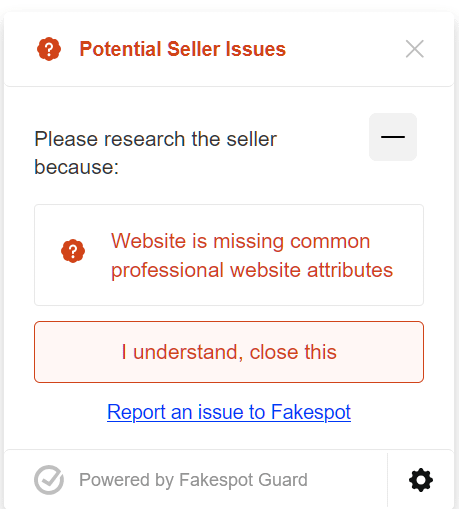
If you’re like us and do a bit of online shopping, you may be interested in this free tool from Mozilla (the Firefox people).

It helps to identify questionable sites with possibly dodgy reviews.phonepad phone call loggging softwareFakespot is available as a plugin from within the Firefox web browser.

Here’s an example from a website we were looking at buying from.

fakespot exampleOf course, it doesn’t pick up everything scammy on the Internet, so you still need to be aware and alert to possible tricks designed to separate you from your money.

By the way, we have no association with Mozilla or Fakespot.  We just think it’s another good tool to help defend yourself against scam websites, and wanted to tell you about it.

Oh, we did pinch their website heading for this post.

PhonePad Version 5.85.1 Has Been Released.

We are pleased to announce the release of PhonePad 5.85.1.

This version fixes issues that were discovered in Version 5.85.0.

Changes in This Release

  • NEW: Added option to specify Reminder check frequency to Preferences.
  • NEW: Added option to System Rules to allow the default Admin account to be excluded from message addressing (see System Rules/Message Settings/Messages/Recipient List).
  • FIXED: Read messages were not being marked as read.
  • FIXED: Category was not being selected when viewing phone messages.
  • FIXED: Cut, copy and paste shortcuts were not working for some fields in phone messages.
  • FIXED: Strange issue where it was not possible to add users.
  • Miscellaneous improvements and fixes.

Important Information About MessageSender

This release is only compatible with MessageSender Version 6.25.0 or later.

Problems?

We’re human too.  We haven’t been replaced by some algorithm – yet. And we’re definitely not perfect.  Like most other humans, we can make mistakes.  So chances are you may come across something that’s not quite working right.  If you do find an error or a bug, please let us know and we’ll fix it as quickly as possible.

Installation Information

Please note: Server Updates must be installed on your Server or Host PC, not your workstation (unless your workstation is also the Host PC) – they cannot be installed directly on your workstations.  Make sure all users are logged out of PhonePad as the PhonePad Server will be stopped during the update and then restarted once it has completed.  Workstations will be automatically updated when PhonePad 5 Workstation is started on each workstation. Important: When downloading and installing an update from your My PhonePad account, make sure it’s actually the update and not the server setup program.

How Updates Work

Please read: You do not need to install every update between this one and the last update you installed.  PhonePad uses a smart update system that compares your current PhonePad system with what’s in the update, works out what changes are required, and then makes those changes.  So if you are a few versions behind don’t worry.  You can skip all of the updates in between and go straight to this update.

Updates and Anti-Virus Software

Depending on the anti-virus software you use, when you install a Server Update your AV software may class the updated software as a different program due to the change in binary signature.  If you experience speed or freezing issues after an update, you may need to reconfigure your AV software to stop real-time scanning of PhonePad.  This may need to be done on the both your Server or Host PC, and your workstations.

Digital Signatures

All PhonePad executables and DLLs are digitally signed for your protection.

You can confirm that a file is safe by right-clicking on it and selecting Properties from the popup menu, and then selecting the Digital Signatures tab.

Downloading the Update

You can download the update from your My PhonePad account.

If you are a current trial user you can download the update by logging in to My PhonePad Trial using the email address you used to start your trial.

Please contact Support if you have any problems or questions.

Installing Updates

If you’re unsure of how to install updates, please watch the video on this blog post.

You will need to have a current Update Plan to install this update.  If your Update Plan has expired, you will need to renew it before you can install this update.

Update Installation Service

If you would rather have the Server Update installed for you, you can arrange for us to remote connect and install it.  The cost is $37 and you can schedule a date and time here: https://www.cybercom-software.com/remote-server-update-assistance.htm .

How Logging Phone Calls Can Transform Your Business.

Running a business is tough, especially when it feels like you’re juggling a million tasks and still dropping a few.

One area where many businesses struggle is managing phone calls.

Missed calls, forgotten details, and a lack of follow-up can cost you customers, sales, and precious time. But there’s a simple solution: call logging.

Let’s dive into how logging your phone calls can save the day and set your business up for success.

A deep dive into phone call logging.1. Never Miss Important Details Again

Have you ever forgotten a key piece of information from a phone call?

Maybe it was a potential client’s name, a callback number, or specific requirements they mentioned.

When you’re busy, it’s easy for these details to slip through the cracks.

Call logging solves this by keeping a record of every interaction.

With call logging, you can:

  • Instantly pull up past conversations.
  • Keep track of customer preferences and needs.
  • Ensure that no detail, big or small, is forgotten.

No more “Who was that?” or “What did they say?” moments—just clear, organized records.

2. Improve Customer Experience

Your customers want to feel heard and valued. If they call back and you already know their name, their issue, and the context of their previous call, they’ll be impressed.

Logging calls helps you create that seamless experience. It shows your customers that you care enough to keep track of their needs, and that builds trust and loyalty.

Plus, faster and more informed responses mean happier customers, which can lead to repeat business and glowing referrals.

phone message pad3. Streamline Team Communication

If you’re running a business with a team, you’ve probably faced the “Who handled this call?” dilemma. Call logging clears up the confusion. Everyone on your team can access the same records, so it’s easy to see who’s handling what. This prevents duplication of efforts, missed follow-ups, and internal chaos.

Imagine this: A team member takes a call and logs the details. Later, another team member checks the log and seamlessly picks up where the first left off. That’s the kind of efficiency call logging brings.

Superb customer service is the result off phone call logging.4. Measure and Improve Performance

Want to know how many calls your team is handling?

How long each call takes?

Which calls convert into sales?

Call logs provide valuable data that you can analyze to improve performance.

Use the insights to:

  • Identify bottlenecks in your process.
  • Train your team to handle calls more effectively.
  • Set measurable goals and track progress.

Measure and monitor results with top notch call logging softwareWhen you know what’s working (and what’s not), you can make smarter decisions to grow your business.

5. Save Time and Reduce Stress

How much time do you spend trying to piece together scattered notes or chasing down who talked to which client?

Call logging eliminates this hassle. Everything you need is in one place, easy to find and easy to use.

That means less time stressing over details and more time focusing on what matters—growing your business.

log phone calls quickly and easily6. Protect Your Business

In today’s world, disputes happen.

A customer might claim they were promised something you don’t remember agreeing to. With call logs, you have a clear record of every conversation. It’s like having an insurance policy for your phone communications.

Whether it’s clarifying misunderstandings or resolving disputes, call logging gives you the proof you need to protect your business.

7. Boost Productivity and Revenue

At the end of the day, efficient systems lead to better results.

When your team spends less time searching for information and more time delivering excellent service, productivity soars.

And when you’re delivering better service, your revenue follows suit. It’s a win-win.

Boost productivity with phone message pad softwareStart Logging Calls Today

The bottom line? Call logging isn’t just a “nice-to-have”—it’s a game-changer for your business.

It helps you stay organized, improves customer experience, streamlines communication, and protects your bottom line.

So, what’s stopping you? Start logging your calls today and experience the difference it can make.

Your future self (and your customers) will thank you.

Try PhonePad for Free

Why You Should Think Seriously About Buying PhonePad.

Why You’ll Want to Buy PhonePad Today

Managing calls and communication effectively is a critical part of running any business. That’s why we created PhonePad—a solution that simplifies call management, saves you time, and helps you stay organized. Here are some compelling reasons why you should invest in PhonePad and how it pays for itself quickly.

1. PhonePad Saves You Time and Money

Time is money, and PhonePad is designed to save you both. By streamlining call management, PhonePad reduces the time your team spends handling and tracking calls. With features like call logging, message tracking, and reminders, PhonePad ensures no call or message slips through the cracks.

Think about how much time is wasted searching for lost messages or missed calls. PhonePad’s centralized system eliminates these inefficiencies. With that saved time, your team can focus on more productive tasks that grow your business. In turn, this reduces costs associated with lost opportunities and missed customer interactions.

2. It Pays for Itself Quickly

PhonePad’s efficiency translates directly into savings and increased revenue. Imagine this: if PhonePad saves just 10 minutes per day for each employee, that’s hours of productivity gained each week. Multiply that across your team, and you’re looking at substantial time and cost savings.

Additionally, the affordable cost of PhonePad makes it a no-brainer. With a minimal investment, you’ll experience a quick return through increased productivity and improved customer satisfaction. For many businesses, the savings from just a single recovered customer interaction can cover the entire cost of PhonePad.

3. Proven Track Record and Trusted by Businesses

PhonePad isn’t just another software; it’s a trusted solution used by countless businesses for years. Our customers consistently report higher efficiency, better call management, and improved customer experiences after implementing PhonePad.

We’ve been in the business of simplifying communication for almost three decades, and our longevity speaks to our commitment to delivering reliable, high-quality solutions. You can trust us to support your business with software that’s been refined and optimized based on real-world feedback.

4. Continuous Updates and Support

When you invest in PhonePad, you’re not just buying software; you’re gaining a partner. Our dedicated team is here to provide ongoing support whenever you need it. Plus, with our Update Plan, you’ll have access to all the latest features and improvements, ensuring that your software remains cutting-edge and effective.

We understand the unique challenges businesses face, and we’re here to help you overcome them with tools that work for you.

5. Easy to Use and Quick to Set Up

PhonePad is designed with user-friendliness in mind. The intuitive interface ensures that your team can get started with minimal training, and the setup process is quick and hassle-free. Even if you’re not tech-savvy, you’ll find PhonePad easy to implement and integrate into your daily operations.

Don’t Wait—Start Saving Time and Money Today

Investing in PhonePad is an investment in your business’s future. By improving call management, increasing productivity, and providing exceptional customer experiences, PhonePad helps your business thrive.

Ready to see the difference PhonePad can make? Get started today and experience firsthand how it can transform your operations. With PhonePad, you’ll save time, save money, and gain peace of mind knowing that your calls and messages are always under control.

Get Started Today