We discovered a problem with RedBackup where it wouldn’t close down when Windows was shutting down, if it was running from the system tray. This has been rectified in Version 1.01 which can be downloaded now. If you have version 1.00 please download this new version. If you haven’t tried RedBackup, it is a FREE backup utility. It’s kind of simple, but then it can be kind of useful too.
New RedBackup Backup Utility
A new application called RedBackup has been added to our free stuff. RedBackup is a simple utility for backing up your important directories and files. You can do manual backups or set RedBackup to do regular backups for you automatically. Download it now and check it out – it’s free!

New Problem Management System for Support
We have introduced a new problem
management system for all support emails. When you send an email to
support you will now be issued with a
case number by our system. This allows us
to track a problem from the moment you report it to us to the time of
resolution. This will make it easier for you to reference problems you
have reported previously and will ensure that none slip through the
cracks. 
We ask that if you enquire about the
status of a problem that you have reported, that you retain the case
number in the email’s subject as this is how the system tracks the
problem. All correspondence about problems should have the case number
in the subject.
Sent An Email to Us and Haven’t Received a Response?
We generally respond to emails we receive
within 24 hours, but often it’s a lot quicker than that. If you have
sent us an email and haven’t had a response by the next day, please
check your anti-spam software. There have been many cases where users have
wondered why we haven’t responded to them, only to find that their spam
filters have dumped our emails in the spam bin. We check ours every day
because our anti-spam software occasionally removes legitimate emails
too.
PhonePad 4 – Subject Not Appearing in Messages Moved to Personal Folders
There is a bug in PhonePad 4 where a
message’s subject disappears when the message is moved to a personal
folder. This is fixed in PhonePad Version 4.03, which is due for release
soon. It is recommended that you don’t move any messages to personal
folders until you install 4.03.
Terminator 1.01 Released.
Terminator Version 1.01 has been released. Sorry, there are no new features in this version. This release fixes a problem with passwords not being changed.
The password encryption algorithms have changed in this version so you may find it doesn’t recognize your current password. If you experience this problem please let us know as it’s easily rectified.
Changing the User Order in the In-Out Board.
Did you know that you can change the order
of users in the In-Out Board? This means you can sort the list in order
of importance, eg. you could put your boss at the top of the list (or at
the bottom 
). All you need to do is hold down the <ctrl>
key, click on the user using the left mouse button, and drag them to the
new position.
Before:

After:

.
The new positions will be remembered
when you start the In-Out Board again so you only have to do it once.
PhonePad Version 4.03.
There have been a few unexpected delays in
getting the next version of PhonePad ready for release. Some of the
enhancements we have been making have taken a lot longer than
anticipated. Of course, the system crash we had didn’t help things
either – it threw our development schedule right out the window as we
needed to devote most of our time getting things up and running again.
We are hesitant to give a definite release date at the moment as we seem to be
jinxing ourselves lately (not that we’re superstitious or anything 
). Suffice to say that it should be available within the next 3 weeks.
Steve
Evaluation Screen Still Displayed After PhonePad Licensed.
If PhonePad 4 is displaying the evaluation screen after you have purchased a PhonePad license, make sure that you have saved the license key (PHONEPAD4.KEY) in the same directoryPhonePad is installed in.
If you still get the evaluation screen, follow these steps:
(1) Run DBConnect.
(2) Click on the System-1 tab.
(3) Under License Key File Location, select the PhonePad 4 license key (PHONEPAD4.KEY).
(4) Click OK.
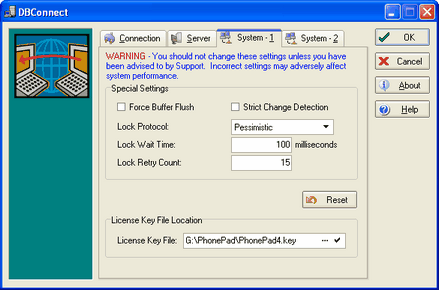
PhonePad 4 should now recognize the key. If this doesn’t work please contact
support@cybercom-software.com.
System Crash!
We experienced a system crash a couple of days ago when a hard-disk decided to call it quits. We are still restoring data. If you have sent us an email in the last few days and haven’t received a response, please send it again and we’ll reply to itimmediately.
Support