Caller ID Software That Helps Offices Never Miss a Call
Every business relies on phone calls — yet most offices still answer the phone with no context at all.
Who’s calling?
Have they called before?
Was this number missed yesterday?
Is this an important client or a first-time enquiry?
PhonePad’s Caller ID feature answers all of those questions before the call is even answered — and that’s why it’s one of the most valuable (and underused) features in PhonePad.
 What Is PhonePad’s Caller ID Feature?

PhonePad’s Caller ID is more than basic number display.
When an incoming call is received, PhonePad automatically:
- Looks up the phone number in the PhonePad Address Book.
- Displays the caller’s name and where they’re from.
- Shows relevant stored information instantly.
This gives reception staff immediate context, helping them respond professionally and efficiently every time.
Instantly Identify Callers Before You Answer
Instead of answering calls blind, PhonePad displays caller details the moment the phone rings.
This allows staff to:
- Greet callers by name.
- Recognize repeat or VIP callers.
- Handle calls more confidently and professionally.
- Reduce awkward pauses and unnecessary questions.
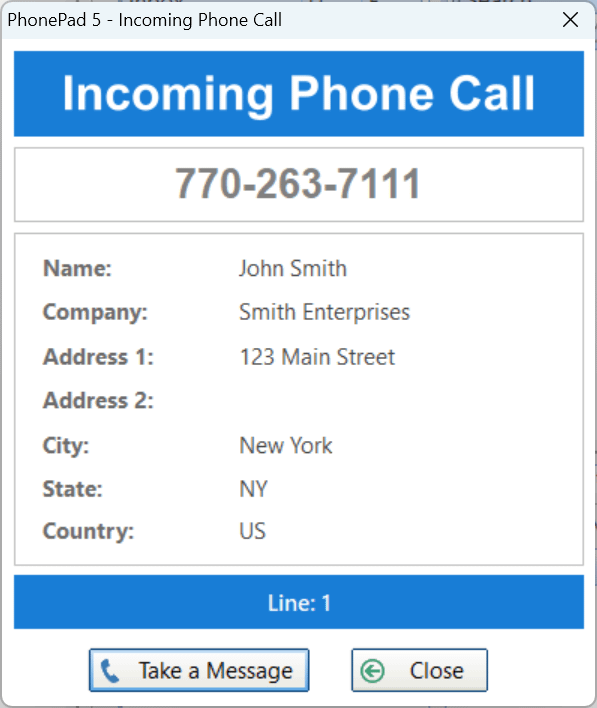 For the caller, it feels personal and organized.
For your staff, it removes pressure and guesswork.
Capture Every Incoming Call — Even Missed Ones
Missed calls are one of the biggest sources of lost business.
PhonePad automatically records all incoming calls, including:
- Calls received outside office hours.
- Calls missed when the phone is unattended.
- Calls that rang out during busy periods.
Users can view the complete call list and even:
- Select a missed call and create a PhonePad message from it.
- Follow up without relying on memory or paper notes.
Nothing gets forgotten. Nothing slips through the cracks.
View Complete Call History in One Place
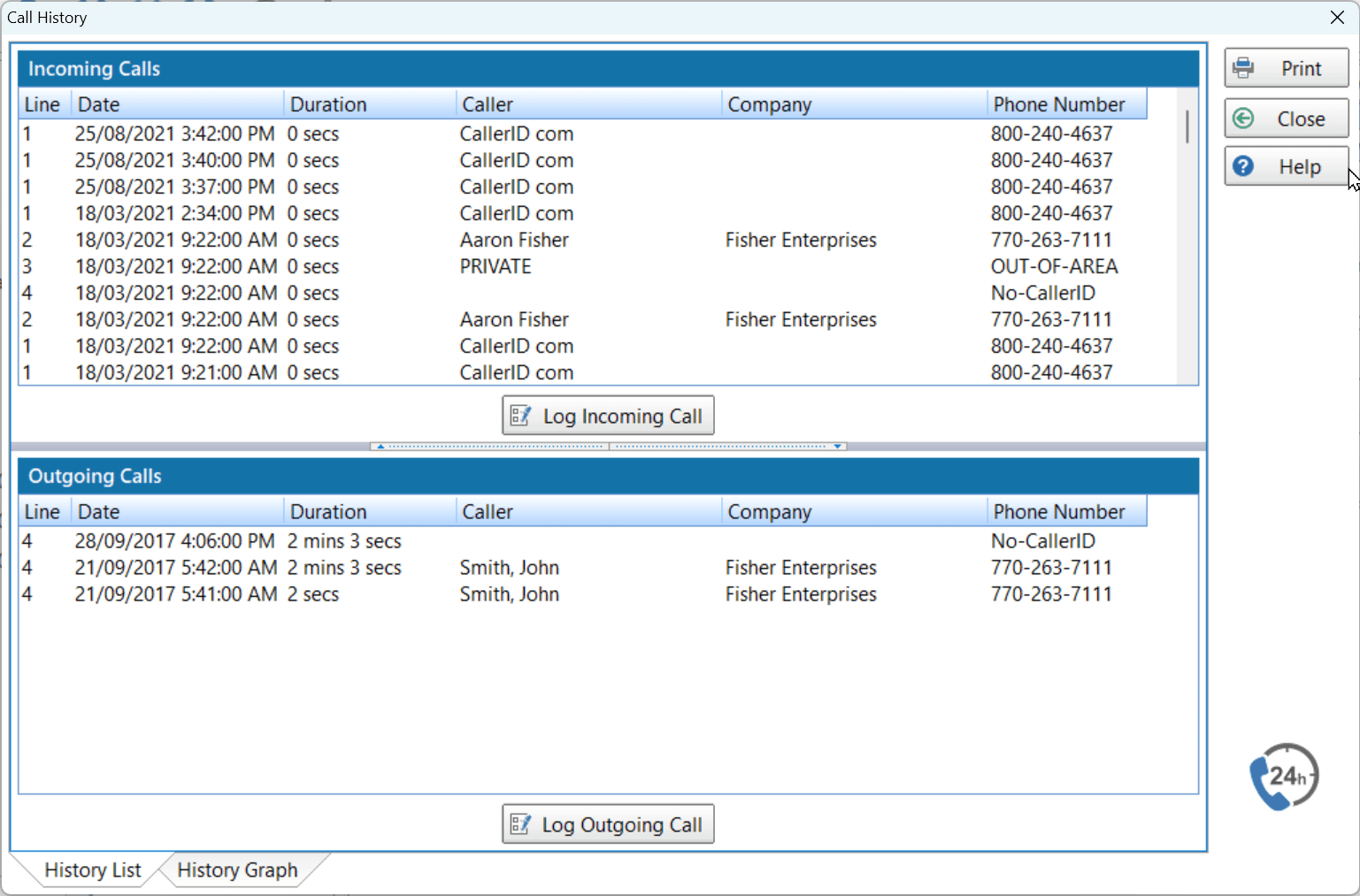
PhonePad maintains a clear, searchable history of:
- Incoming calls.
- Outgoing calls.
- Caller names and companies.
- Phone numbers and timestamps.
This is invaluable for:
- Checking whether someone called.
- Confirming call activity.
- Supporting staff accountability.
- Reviewing communication history with clients.
It’s phone call tracking made practical — not complicated.
 Track Call Volume and Spot Patterns Over Time
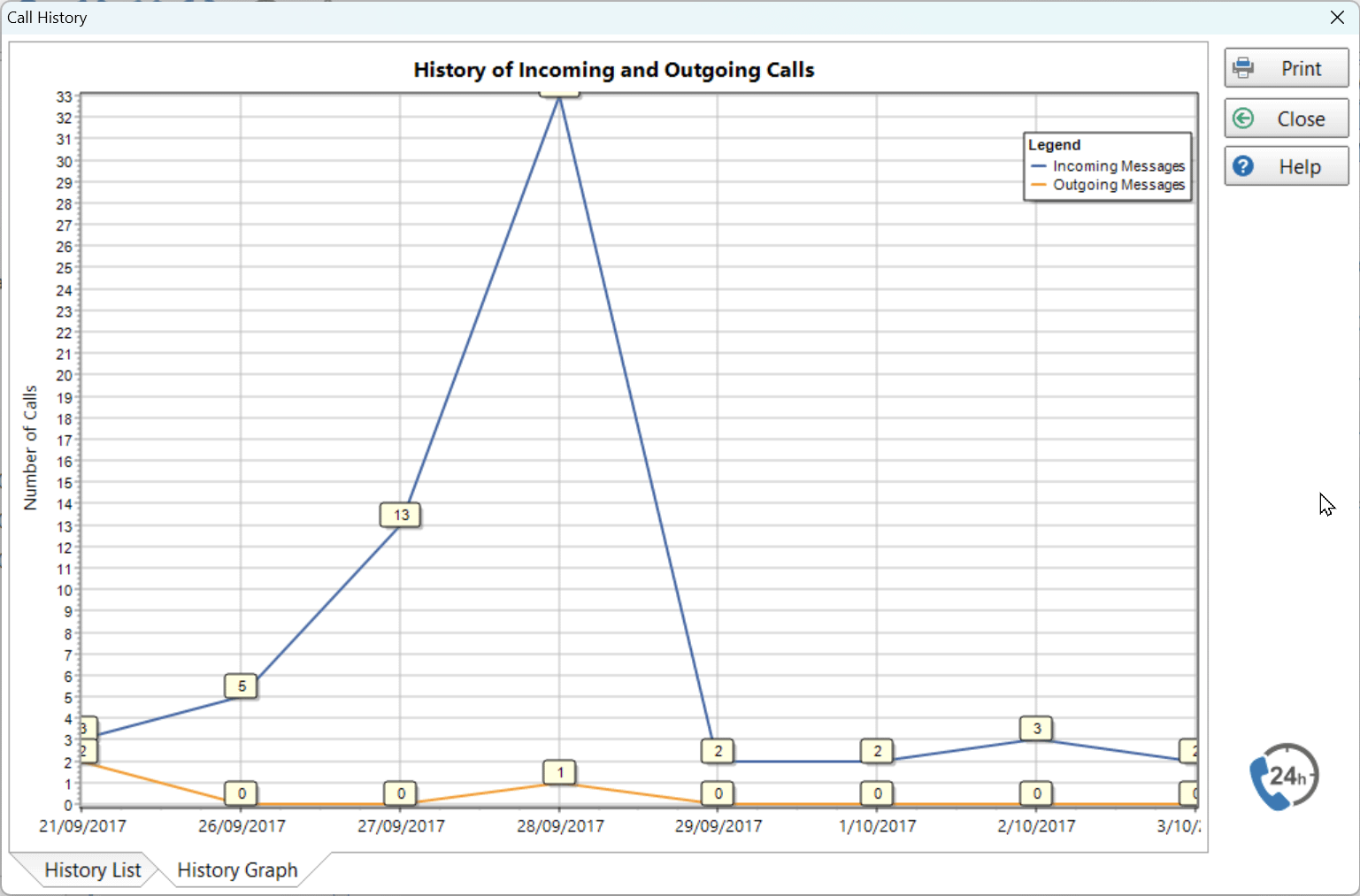
PhonePad also tracks how many calls your office receives and presents it visually in a call history graph.
This helps you:
- Identify peak call times.
- Understand workload at reception.
- Make better staffing and scheduling decisions.
- Gain insight into office phone activity.
Most offices don’t realize how useful this information is — until they can finally see it.
Why Caller ID Matters for Professional Offices
PhonePad’s Caller ID is especially valuable for:
- Law firms.
- Medical practices.
- Accountants.
- Small to medium businesses with reception staff.
It creates:
- Consistency across shared phones.
- Confidence for staff covering reception.
- A better experience for callers.
- A clear record of phone activity.
And it does all this automatically, in the background.
 The Bottom Line

PhonePad’s Caller ID feature turns phone calls from interruptions into organized, trackable interactions.
It helps your office:
- Sound professional on every call.
- Never miss or forget a caller.
- Reduce errors and confusion.
- Gain visibility into call activity.
Once you’re used to having this information instantly available, answering calls without it feels like stepping back in time.
Device Compatibility & Caller ID Hardware
(A quick, honest note)
Some PhonePad Caller ID features rely on compatible Caller ID hardware devices, such as those available from CallerID.com.
These devices provide the incoming caller information that PhonePad uses to:
- Identify callers.
- Display caller details on screen.
- Log incoming call activity automatically.
If compatible Caller ID hardware is already in place, PhonePad can take full advantage of the information it provides.
If not, suitable devices are readily available and easy to add to existing phone systems.
The result is a flexible setup:
- PhonePad works with supported Caller ID devices.
- You’re not locked into proprietary phone systems.
- You can choose hardware that suits your office environment.
This ensures PhonePad integrates smoothly with real-world office phone setups — not just idealized ones.
If you have an existing phone system and are unsure about compatibility, let us know. We’re happy to review your setup and do our best to integrate PhonePad with it.
Ready to Stop Guessing Who’s Calling?
If you’re already using PhonePad, make sure Caller ID is fully enabled and your Address Book is up to date — you’ll see the benefits immediately.
If you’re not using PhonePad yet, this is just one of the many ways it helps offices manage calls properly.
Your phone rings every day.
You may as well know who’s on the other end.