Many software companies provide, for an additional fee, a “download protection” option when you purchase software from them. This supposedly provides you with access to download the software again within a certain period (eg. 1 or 2 years) if the need arises.
For example, maybe your server crashed and you need to reinstall the software, only you can’t remember where you stored the
original software you downloaded. Or perhaps it was on the server that has now gone to server heaven.
As you have purchased the “download protection” you can download the software again and reinstall it.
Do you lose access to the software after that period? No idea because we never select that option ourselves when we purchase software from another company. We make sure we store it in a safe place that is always backed up.
Anyway, you can’t purchase a “download protection” option when you purchase our software because we don’t offer one.
That’s because you always have access to the software you purchased via your online account. You can download it again as many times as you want, whenever you want. And there is no “download protection” fee for this.
So if you lose the original software you downloaded and need to reinstall it, have no fear. You always have access to it. And it won’t cost you anything.
We are pleased to announce the release of AutoBackup Version 2.4.2.
This version has the following improvements:
- AutoBackup Manager’s user interface has been updated..
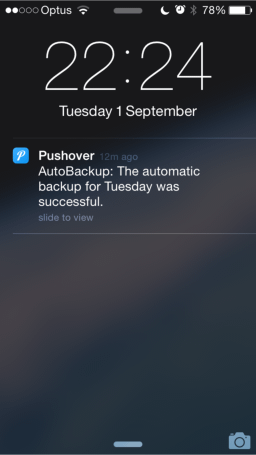
- You can now receive backup notifications on your iPhone or Android phone. The notifications inform you whether your backups have been successful or have failed.
The following changes are included:
- Fixed incorrect date format being displayed in backup log.
- Fixed issue where backup files were sometimes not being displayed.
- Added log for AutoBackup Manager.
- Changed log files folder to C:\ProgramData\Cybercom Software\AutoBackup.
- Minor fixes.
AutoBackup can be downloaded from the AutoBackup page, or from My PhonePad Account. This is a free minor update if you already have an AutoBackup license*.
* AutoBackup is a separate purchase from PhonePad.
We’ve been getting a few inquiries about whether or not PhonePad 4 is compatible with Windows 10. The answer is Yes.
As with previous version of Windows, we have tested PhonePad 4 with Windows 10 and have not found any problems.
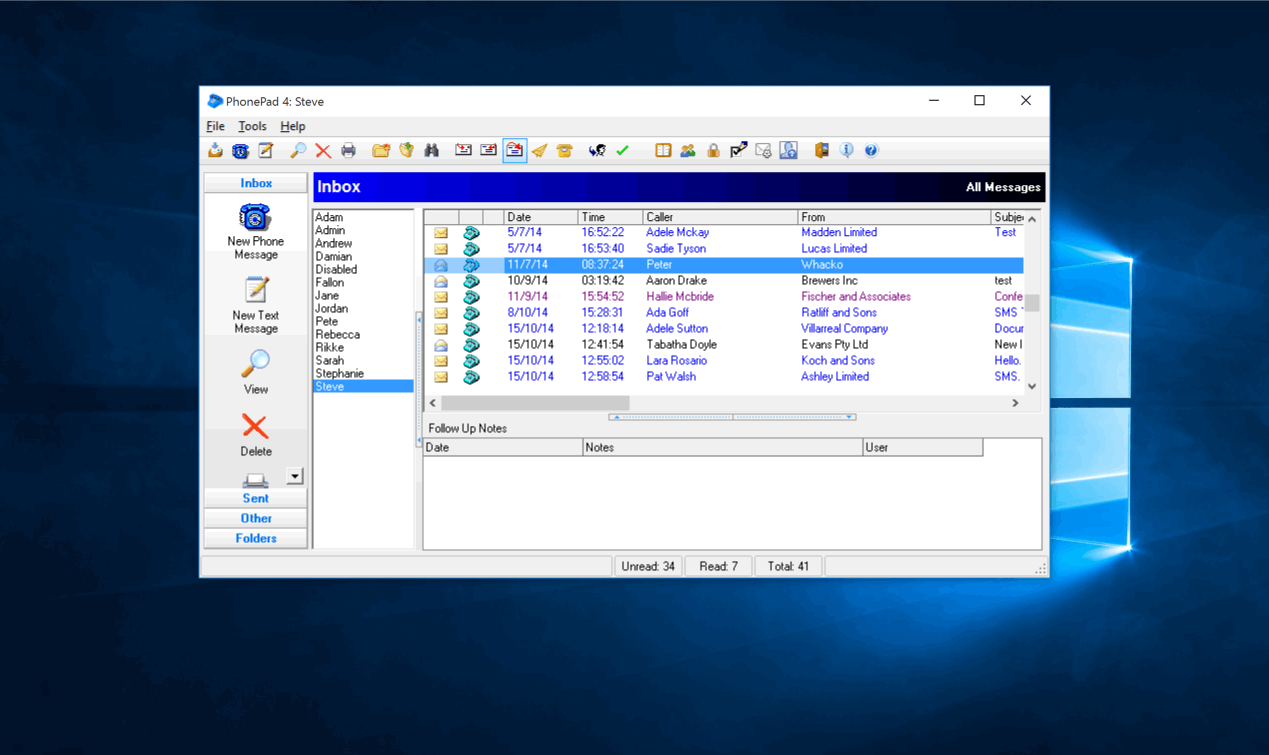
To take it even further, here is a screenshot of PhonePad 4 running under Windows 10, which is running in a virtual machine under Mac OS-X Yosemite, on a MacBook Pro. PhonePad is using Remote Mode to connect across a peer-to-peer network to a Host PC (a Dell computer) running Windows 7.
If there were going to be any compatibility issues this is where you could expect to find them.
Please contact us if you have any questions.
If you tried to purchase PhonePad but were unable to, we’re really sorry. There was a temporary issue with our purchasing system
caused by an update.
We chased that gremlin around and finally managed to catch it. Cheeky little rascal.
The good news is it’s now up and running again. If you were unable to purchase please try again.
Thanks.
We’re pleased to announce that the PhonePad Referral Program is now live.
What is the PhonePad Referral Program?
The more people there are that use PhonePad, the more resources we can devote to developing and improving it. Â Many of our customers recommend PhonePad to their colleagues, but we want to encourage more people to do this.
So we decided to introduce a program that would reward people who recommend PhonePad. Think of it as a rewards program.
As a member of the Referral Program (which costs nothing to be part of), when you recommend PhonePad to someone and they decide to buy it, they will receive a discount off the purchase price, and you will receive a referral payment equal to that discount.
How Does the PhonePad Referral Program Work?
Let’s say you recommend PhonePad to Jeanette. Jeanette tries PhonePad, likes it, and decides to purchase it. You give Jeanette a special Referral Code you receive from the Referral system. Jeanette gets a 15% discount off everything in the shopping cart. On top of that you get a 15% referral fee as a thank you from us for referring Jeanette.
So if Jeanette purchased a 30 user license for $507, she would get a discount of $76 by paying only $431. You would receive a referral payment of $76.
What Discounts Are There?
The discount received by your colleague depends on how many successful referrals you have made. It ranges from 10% up to a massive 25%. The more you recommend PhonePad, the more your colleagues will save and the bigger the referral payments you will receive.
More Information
To find out about the PhonePad Referral Program, please visit the special website we have set up for it: http://www.cybercom-software.com/referralprogram/
Please contact sales@cybercom-software.com if you have any questions.

All of our software is digitally signed with a unique security key. It is your guarantee that the applications have not been altered by anyone, or by a virus or other malicious programs.
Despite this, if you open PhonePad, or any of our other applications that are located on a network drive you may get a security warning message similar to this when you try to open it:
This can get annoying really quickly when you have to deal with this message every time you open/run the app. Fortunately, there is an easy way to get rid of it – permanently.
1. Open Control Panel.
2. Select Internet Options.
3. Click on the Security tab.
4. Select “Local Intranet”.
5. Click the Sites button.
6. Click the Advanced button.
7. Enter the network path and click Add.
8. Click Close.
9. Click OK.
10. Click OK.
Now try opening any app in that folder. You should no longer get the message! End of frustration.
We have had a few emails asking what the difference is between TextMessenger and MessageSender. They are very similar names so I can see how it could be confusing.
I will try to explain the differences.
TextMessenger is a standalone application that can send text messages to mobile devices such as iPhones, Android phones and so on. When you want to send a message you just type it into TextMessenger and click Send. It will be then delivered to the mobile devices that you selected, via the Pushover service.
TextMessenger is completely separate from PhonePad and MessageSender.
MessageSender is an application that automatically forwards your PhonePad messages to email or your mobile device.
PhonePad has an Automatic Message Forwarding feature. You can add an email address, your cell phone number, or your device name, and if MessageSender is installed it will automatically send your phone messages to you using email, SMS and/or the Pushover service as they are created in PhonePad.
Using MessageSender, your phone messages can be automatically sent to an email address and mobile devices when you are out of the office, or even if you are in the office. You can set the criteria of when they should be sent.
As you can see, TextMessenger is a separate application for manually sending text messages, whereas MessageSender works in conjunction with PhonePad to automatically forward your phone messages to you using email or text messages (either SMS or Pushover).
I hope that’s a little clearer, but let us know if it isn’t. 🙂
We’re excited about a brand new product we have just released: TextMessenger.
TextMessenger is a Windows application that allows you to send text notifications from your desktop or laptop computer. And you can send them for free. More about that shortly.
You can send messages immediately, or schedule them to be sent at a later date and time.
When you send a message you can set the priority and even what sound you want played on the receiving device to get their attention!
You can send messages to individual people or blast it out to everyone.Â
TextMessenger keeps a complete history of all messages sent.
TextMessenger doesn’t use your normal SMS network. It uses the awesome Pushover service.
Messages can be sent to iOS and Android devices. And not just phones either. As the system doesn’t use SMS networks, messages can be sent to any iOS or Android device that has an Internet connection.
And now here’s the great news! Using TextMessenger with Pushover you get 7,500 free messages every month.
So here’s the bottom line:
- TextMessenger is just $37. That’s a one-time cost.

- The Pushover iOS and Android apps that you will need to receive the messages are just $5. What’s really cool is that is per platform. What that means is that once you buy the iOS app, for example, it is free for all subsequent iOS devices to install it on.
- Messages are free as long as you don’t exceed 7,500 per month. That’s a lot of messages.
- All up you’re only paying a one time cost of just $42 – $47 (depending on whether or not you need both iOS and Android).
More details are available on the TextMessenger website. Download it today for a 10 day free trial.
We have some new apps in the works. One is going to be released Monday next week, and the other will be released in a few weeks. It’s all a bit hush hush at the moment but we think you’re going to like them.
There is also a new version of MessageSender coming out. And of course the next release of PhonePad is also being built.
That’s all for now.
The SupportCenter application that comes with PhonePad has been long overdue for an update. So we added some new links, got rid of the old outdated ones, and gave the interface a bit of a makeover while we were at it.
In case you didn’t even know it existed, you can access SupportCenter from the Help menu in PhonePad, or you can run it directly from the PhonePad folder.
SupportCenter gives you quick ways to contact us for support. It also gives you quick access to many helpful areas on our website. If you’re not sure where to find something then the SupportCenter is a good place to start.
From the SupportCenter application you can:
- Access the latest PhonePad news.
- Check to see if you have the most recent version.
- Access your online PhonePad account.
- Access the online interactive setup guides that show you how to install and set up PhonePad.
- Purchase PhonePad.
- License your copy of PhonePad.
- Access the online Knowledge Base.
- Plus more.
SupportCenter Version 1.2.0 is available in the latest version of PhonePad, but you can also download it separately if you wish.