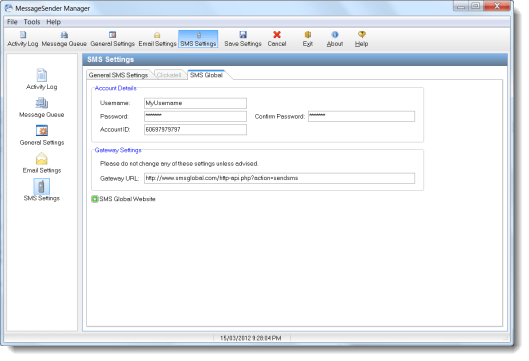
Before you can use MessageSender to automatically forward your phone messages to your cell/mobile phone via SMS (Short Message Service), you need to establish an account with an SMS gateway provider. In this article, we are going look at doing this using SMS Global.
Generally, you don’t have to sign any contracts or sign up for a specific amount of time. You just purchase the number of credits you want, and replenish these when they run low.
The first thing to do is visit the signup page on the SMS Global website. You need an account that allows sending SMS messages via HTTP. Once you have created your account SMS Global, you should have the following details:
- Username
- Password
- Sender ID
We will need each of these things to set up MessageSender.
- Run MessageSender Manager.
- Select SMS Settings.
- Under General SMS Settings, select SMS Global for the SMS Gateway.
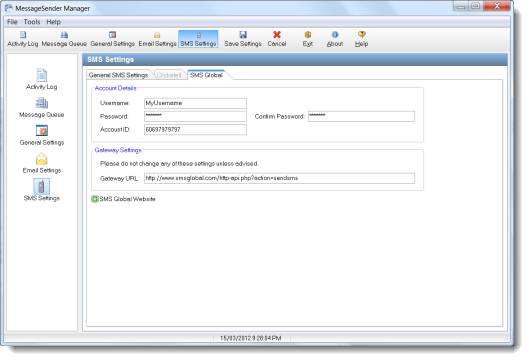
- Select the SMS Global tab.
- Enter your SMS Global Username in the Username field.
- Enter your SMS Global Password in the Password field.
- Enter your Sender ID in the Account ID field.
- Click Save Settings.
That’s it. If you have any problems, please contact us at support@cybercom-software.com
A new version of MessageSender is now available. Version 5.07 has the following changes:
- Now creates application data folder for INI file if it doesn’t exist.
- If data corruption is detected, the problem should now be logged in the Activity Log (instead of causing the service to stop).
- Minor fixes.
If you are upgrading from a previous version of MessageSender 5, you will need to stop and uninstall the MessageSender service (this can be done in MessageSender Manager) on your network before upgrading to the new version, otherwise Windows will report errors.
You can download MessageSender 5.07 from the MessageSender home page or from My PhonePad Account.
PhonePad Version 4.19.5.0 has been released to address the following issues:
- PhonePad not remembering printer selection – FIXED.
- Performance improvements for searches.
- Other minor fixes.
Important: Please remember to run DBUpdate after installing the upgrade as database changes are also required.
If you are a PhonePad client then you can download PhonePad from your online account: www.myphonepad.com. Or you can download it from the PhonePad download page.
As previously mentioned, support will be a little slower than normal for the next couple of weeks. From Nov 7 to Nov 18 2011, our office will be closed while we take a short break before commencing some serious development work on the next major release of PhonePad. We will still respond to your support requests, but it will take us a little longer to get back to you (typically 48 – 72 hours, instead of the usual 24 hours).
Only email support will be available during this period. We will be unable to answer your phone call or return your calls. Additionally, remote support will be unavailable.
Don’t worry – we will respond to your emails and everything will be back to normal on Nov 19 2011.
Please note: Our ordering system is fully automated so if you are wanting to purchase a PhonePad license then you can still do this. Your order will be processed and you will receive your license within a couple of minutes.
PhonePad Version 4.19.4.0 has been released to address some issues that have been discovered since the release of version 4.19:
- Errors displayed when searching in the message field – FIXED.
- Follow up notes were not always saving correctly – FIXED.
- Follow up list not always refreshing in folders when changing folders – FIXED.
- Message list and follow up list and not refreshing when main screen resized – FIXED.
- Message printing not remembering printer selection (File/Print Setup) – FIXED.
You do not need to run DBUpdate after installing the upgrade (there have been no database changes), unless you are upgrading from a version prior to 4.19.
If you are a PhonePad client then you can download PhonePad from your online account: www.myphonepad.com. Or you can download it from the PhonePad download page. If you already have version 4.19 installed (4.19.0.0 or later), then you can download just the PhonePad executable if you prefer: http://www.cybercom-software.com/files/PhonePad4.exe
Generally we work and provide support 363 days of each year. This year we are taking a short break as we prepare for a new period of intensive software development, so our office will be closed from November 7 to November 18, 2011. This will affect sales and support:
- Email support will still be available, however, the response time will be up to 48 – 72 hours (rather than the normal 24 hours).
- We will not be able to respond to, or return, phone calls until November 19, 2011 onwards.
- Remote support and online chat will not be available.
- Online ordering will still be available as this is an automated system.
We apologize for any inconvenience this may cause, and we appreciate your patience and understanding. All sales and support services will be back to normal on November 19, 2011. Until November 7, it’s business as usual.
PhonePad Version 4.19.2.0 has been released to address some issues that have been discovered since the release of version 4.19:
- In some cases, messages in folders were not being found during searches – FIXED.
- Follow up details in folders were not always displayed correctly – FIXED.
- Added drop-down list for searches, which retains previous searches for current PhonePad session.
- Added an option under Preferences for selecting the TAPI device if it’s not detected automatically.
You do not need to run DBUpdate after installing the upgrade (there have been no database changes), unless you are upgrading from a version prior to 4.19.
If you are a PhonePad client then you can download PhonePad from your online account: www.myphonepad.com. Or you can download it from the PhonePad download page. If you already have version 4.19 installed (4.19.0.0), then you can download just the PhonePad executable if you prefer: http://www.cybercom-software.com/files/PhonePad4.exe
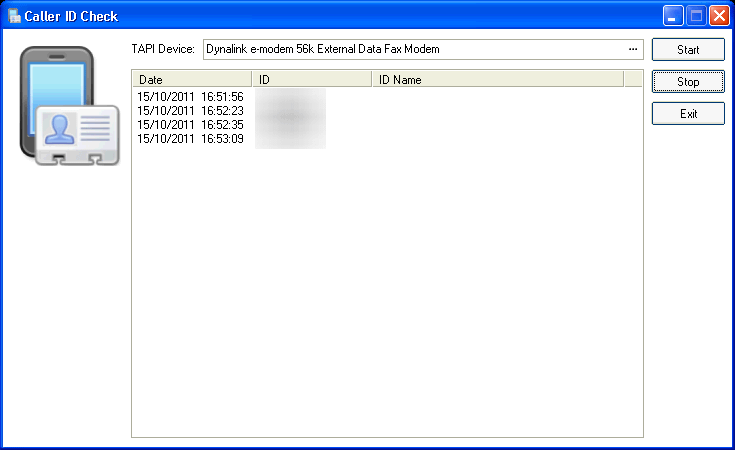
Does your modem or other device support TAPI, specifically Caller ID? To make sure that your device will work with PhonePad’s Caller ID features, check it with this new utility. Download Caller ID Check and test it with your device.
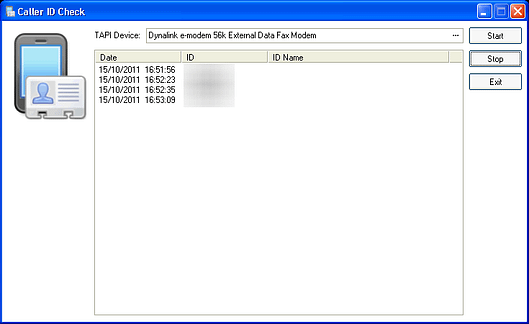
To use this utility, you will first need to select your TAPI device. Next, click the Start button so that CallerIDCheck will start listening for phone calls. If your device supports Caller ID, phone numbers will be displayed in the utility when your phone rings. If you click the Stop button, the utility will stop listening for calls. The Exit button closes the utility.
We were very saddened to hear about the passing of Steve Jobs. Thank you Steve for all of your wonderful products, but more importantly for your amazing vision and courage. You will be missed.
PhonePad Version 4.19 has been released and is now available for download.
Changes
- Added Inbox filtering options to File menu.
Fixes
- Fixed speed issues and errors on searches.
- Fixed text printing errors.
- Fixed missing message icons on search results.
- Fixed issue with wrong follow up details being displayed when editing or viewing follow up notes in personal folders.
- Fixed issue with custom labels not being displayed in phone messages.
- Added warning message when trial period or temporary license has 7 days or less to go.
- Other minor fixes.
Please remember to run DBUpdate after installing the upgrade as database changes are also required.
If you are a PhonePad client then you can download PhonePad from your online account: www.myphonepad.com. Or you can download it from the PhonePad download page.