 We all know how important it is to backup data on a regular basis. But who remembers to do it as often as we should? It’s usually not until something happens and we scramble for the latest backup that we realize just how long ago the last backup was done. Having had 3 hard drive failures in the last 5 years, I know that dreaded feeling.
To make it easy for you to remember to back up your PhonePad, or perhaps not remember, we will be shortly releasing PhonePad Automatic Backup. This new application runs as a Windows service that you can literally set and forget. Just specify how often you want backups performed and Automatic Backup will take care of the rest.  Amazingly, users don’t have to log out while backups are being done – they can be performed even when users are still logged in and using PhonePad.
PhonePad Automatic Backup should be available in the next few days at a very reasonable price.
We have discovered that user accounts for the support forums have not been successfully migrated during our recent change in web servers. Damn. Sorry about that. We’ll get it sorted out as soon as we can.
All website problems have been rectified so everything should be back to normal now. You can download PhonePad from the download page as before.
We are experiencing some problems with a couple of our systems that are hosted with another web hosting company. For some reason their servers are not responding. This affects downloading PhonePad. Until we find out what’s going on with the web hosting service and things are rectified, you can download PhonePad using this link: http://www.cybercom-software.com/download/phonepad4setup.exe.
Sorry for any problems you may have encountered. We’re kind of getting sick of unreliable web hosting companies (not counting the one that hosts this site).
We’ve had a busy weekend. We combined the release of our new website design with the move of everything (website, blog, forums, etc.) to another web hosting service. This also involved recreating all of our email addresses and changing mail servers.
Things didn’t exactly go according to plan and there were a few hair pulling moments. If you had trouble accessing anything over the last few days please try again. Most things are back to normal but there may be the odd broken link or two. These will be rectified as quickly as possible.
The website has been redesigned to make it easier to navigate and find what you’re looking for. The new Learning Center has some tutorials for installing PhonePad, and we will be expanding this to include a lot more tutorials and other information on how to get the most out of PhonePad.
We will soon be releasing our new client portal, My PhonePad Account, which will allow you to easily update your details, download the latest versions of PhonePad, retrieve your license keys, access user guides and manuals, and a lot more.
If you find anything that’s not working please let us know.

We’re pleased to announce that PhonePad 4.13 has been released and is now available for download.? Version 4.13 has the following changes:
- Fixed problem with sorting in Address Book list where lower case names wouldn’t sort properly.
- Fixed problem where double-clicking on the Address Book list wasn’t opening an entry for edit.
- User passwords are now masked in PhonePad Admin and administrators are now required to confirm passwords .
- Disappearing envelope icons problem in Inbox message list has been fixed.
This a free update for all licensed clients.
 Spam filters seem to be working overtime lately.? We have had a lot of complaints from customers (and prospective customers) that they are not receiving emails from us.? This is happening when they enter their details to download PhonePad, receiving licenses and communicating with Sales and Support, etc.
In all cases emails have been sent out by us but they have been caught by over zealous spam filters.? We have had to contact customer’s ISPs a few times to sort things out so the emails could get through.
So, if you are expecting an email from us and haven’t received it, please check your email spam filters to see if it has eaten our emails.? If you don’t have a spam filter on your computer or network, please check with your ISP.? They may need to add us to their white lists.? Emails from us generally come from sales@cybercom-software.com, support@cybercom-software.com or info@cybercom-software.com
Here’s some good news: PhonePad is now available on CD.
If you’d like a physical copy of PhonePad, you can now get it on CD when you buy PhonePad, for just an extra $15 (to  cover shipping and handling).? Or if you already have a PhonePad license you can buy the CD separately (also for $15).
There is no difference in content between the PhonePad you can download and what’s on the CD, but we found that many people like to have a physical package as well.
The CD is handy to keep as a backup, or for when you want to install PhonePad on a new computer and couldn’t be bothered with downloading it again.
Personally, I buy a lot of software and always get the optional CD.? I rarely use it, but it’s sitting there on my shelf if I ever need it.
You can get your PhonePad CD from the PhonePad order page.
We are pleased to announce that PhonePad Version 4.12 has been released and is available for immediate download.
The main purpose of this release is to improve performance for users with large Address Books.? If you find that the phone message form takes a long time to load is release includes the following new features and changes:
- Improved performance for phone message form loading
- New drop-down lookup list for looking up callers
- Improved Address Book list with improved incremental searching and column sorting
- “Back At” time in In-Out Board can now be blank.
- Improved archiving in PhonePad Admin
This is a free upgrade for all licensed PhonePad users.
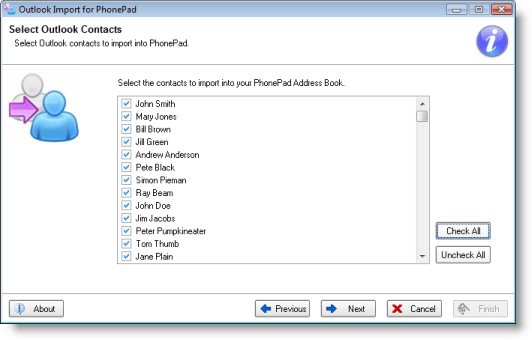
Importing your Outlook contacts into the PhonePad Address Book has always been a bit tedious.? Ok, it’s been annoying too.? To make things a lot easier we have just released the Outlook Import wizard.? It has been tested with Outlook 2003 and 2007 under Windows XP and Vista.
 Of course, like most of the PhonePad utilities we produce to make your life easier it’s free.? You can download it by clicking here.? It comes with a 6 page instruction manual.? Extract the zip file to your PhonePad folder and you’re all set to go.
 Spam filters seem to be working overtime lately.? We have had a
  cover shipping and handling).? Or if you already have a PhonePad license you can buy the CD separately (also for $15).
 Of course, like most of the PhonePad utilities we produce to make your life easier it’s free.? You can download it by