Manage your phone messages quickly and easily with PhonePad!

Why Every Professional Needs PhonePad Web.

Secure, Streamlined, and Designed to Keep You in Control.

In a world that’s always on and relentlessly fast-paced, one missed message can mean one lost client, a critical delay, or even a legal or medical misstep. Whether you’re in business, the trades, law, medicine, or government, your communication system isn’t just a tool – it’s your lifeline.

That’s why PhonePad Web is trusted by professionals who can’t afford to leave messages, client data, or follow-ups to chance.

Business Professionals: Work Smarter, Not Harder

Running a business means juggling meetings, clients, deadlines, and decisions – all at once. PhonePad Web turns chaos into clarity.

Why it matters:

  • Access your phone messages when you’re away from the office.
  • Never lose track of follow-ups, action items, or call-backs.

PhonePad Web helps you keep your business running smoothly, even when you’re out closing deals.

Tradespeople: Don’t Miss Work While You’re Doing Work

Receive phone messages when you in the field.

Why tradespeople rely on PhonePad Web:

  • Office staff log messages in real time so nothing slips through.
  • Get job details, client notes, and addresses instantly – no more back-and-forth.
  • Protect your reputation with prompt, professional follow-up.

Attorneys: Precision Communication. Total Control.

Your time is billable. Your messages are confidential. Your work is high-stakes. Why trust sensitive data to an unknown cloud?

PhonePad Web gives attorneys the edge with:

  • Clear, organized logs of every message and client call.
  • Internal notes shared securely between legal assistants and partners.
  • Full control over where client data lives – on your network, not in the cloud.

It’s built for legal minds who understand that security isn’t optional – it’s essential.

Doctors & Medical Staff: Speed and Security in One Place

You can’t care for patients if you’re buried in miscommunication. PhonePad Web empowers medical offices to streamline their operations while keeping patient data safe.

What doctors love about PhonePad Web:

  • Front desk staff relay patient messages instantly and securely.
  • Doctors can access notes and client info, wherever they are.

Government Officials: Accountability and Efficiency, Built In

From handling constituent concerns to managing department communications, public servants need tools that are both secure and transparent.

Why government agencies trust PhonePad Web:

  • Messages are time-stamped and accountable – no ambiguity, no confusion.
  • Data stays within your local environment – essential for public trust.
  • Reduces bottlenecks and ensures every message gets the attention it deserves.

It’s built for service. Designed for integrity.

Real Estate Agents: Don’t Miss the Next Big Deal

In real estate, timing is everything. That “just listed” call or urgent buyer message needs to be captured and followed up – fast.

PhonePad Web helps agents close deals by:

  • Helping your staff capture and organize all incoming messages while you’re showing a property.
  • Keeping track of leads, buyer questions, and follow-up tasks with clarity.

Ensuring your assistant or team never drops the ball when you’re out in the field.

It’s the virtual assistant every agent wishes they had.

Office Managers: Power, Clarity, and Oversight

You’re the glue that keeps everything together but managing message chaos? That’s not what you signed up for.

PhonePad and PhonePad Web gives office managers control with:

  • Centralized message tracking across staff and departments.
  • An organized digital trail for follow-ups, client needs, and accountability.
  • Time-saving workflows that reduce phone tag and sticky notes.

Stay on top of every message, without micro-managing.

Why You Shouldn’t Wait

  • No subscriptions. No hidden cloud costs.
  • Runs on *your* network – so you stay in control.
  • Perfect for any office size.

PhonePad Web isn’t just software – it’s peace of mind.

Whether you’re managing a legal case, on a job site, in a hospital corridor, or running a business, one thing is always true: missed messages create missed opportunities.

PhonePad Web makes sure that never happens again.

Find Out More


How Safe is Your Data on Cloud-Based Systems?

I’m not saying cloud-based systems are a bad thing. Heck, we use some cloud systems too. They’re convenient, scalable, and often play nice with a bunch of modern tools. But I often wonder – just how safe is the data we entrust to them?

How secure are the data centers, really?

Who exactly has physical or digital access to the servers holding your business’s lifeblood? Are these facilities nestled in a fortress, or behind a locked door in a suburban office park?

And let’s not forget the history – have they ever been breached? Will they be? There’s a fine line between “secure” and “we hope no one notices.”

Then there’s the big one: is your data just sitting there quietly, or is it being analyzed, mined, or processed for performance insights? That’s corporate-speak that often makes me raise an eyebrow.

That’s why we built PhonePad Web differently. With PhonePad Web, your client data stays close to home – safely stored on your network, under your control. It’s your information, and it should stay that way.

You don’t have to worry about distant servers, vague privacy policies, or surprise data mining. Just focus on your work, knowing your information is right where it should be.

One less thing to worry about in this crazy world

Introducing PhonePad Web: Access Your Calls Anytime, Anywhere!

We’re really excited to introduce PhonePad Web – a powerful new way to receive your phone messages on any smartphone with a browser, without installing any software!

No, it’s true. You do need to install something on your PhonePad Server (or Host PC though. Otherwise it wouldn’t work. We’re not magicians you know, although I always wanted to be one. Is it too late to start a new career? I digress.

Whether you’re working from the office, from home, or even on the move, PhonePad Web gives you seamless access to your messages, appointments, and contacts. It’s designed for flexibility, speed, and simplicity, while still giving you the reliability you’ve come to expect from PhonePad.

What Is PhonePad Web?

PhonePad Web is a browser-based application that connects to your PhonePad Server, allowing you to receive and view your phone messages directly from your web browser.

No need to install anything on your smartphone. No compatibility issues across different devices. If you can open a browser — you can open PhonePad Web.

It’s like having a mini version of PhonePad in your pocket, or handbag.

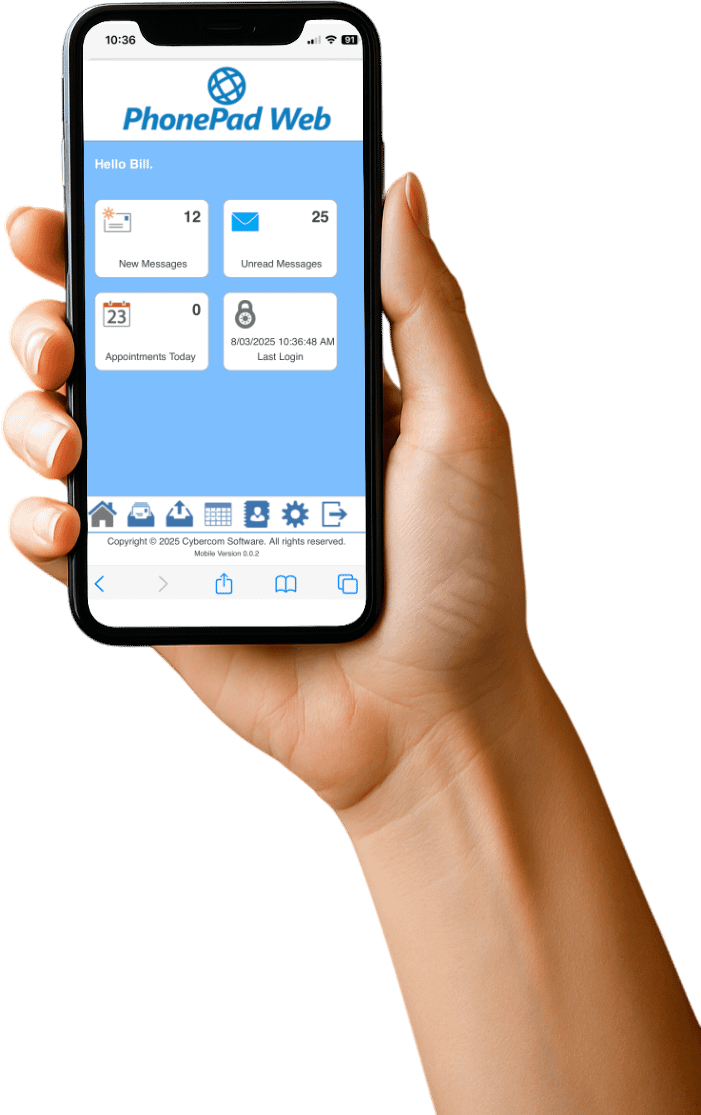
The PhonePad Web Home screen shows you an overview of what’s happening: number of new messages, number of unread messages, and the number of appointments you have for the day.

Take Your Phone Messages With You.

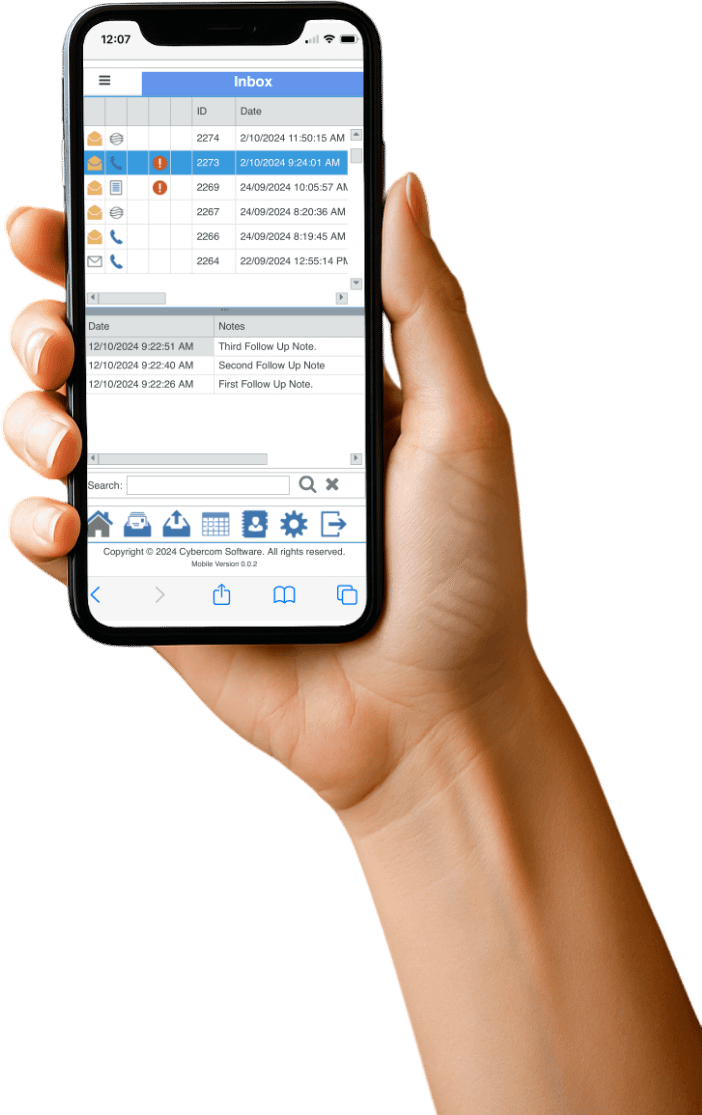
Now you have access to both your Inbox and Sent messages folder, wherever you are. Oh, and follow up notes too. Nice.

See Your Appointments

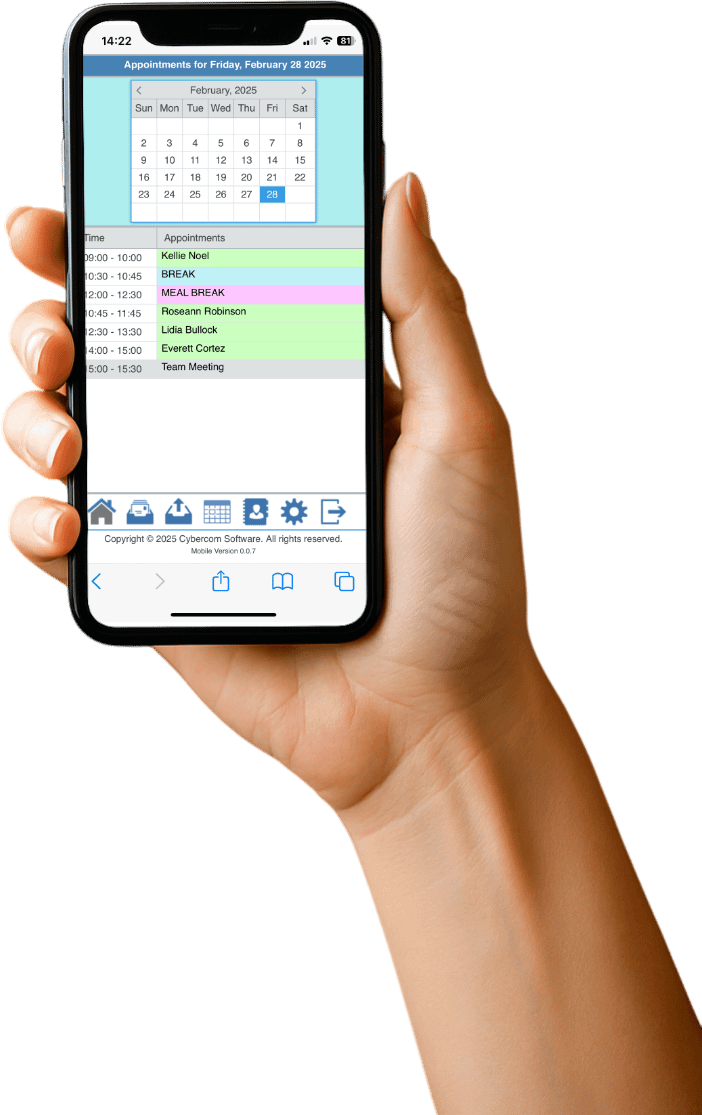
You can also see all of your appointments for the day from PhonePad’s Appointment Calendar. All on one screen.

Look Up Your Contacts

You might be out of the office but it doesn’t mean you can’t look up details about the contacts in your PhonePad Address Book.

With PhonePad Web, they’re all there in your hand. How handy is that? Get it? Hand. Handy. I’ll see myself out.

Some Benefits of PhonePad Web

  • No installation required – Access PhonePad Web through Chrome, Edge, Firefox, Safari, or your favorite browser on your smartphone.
  • Real-time messaging – Instantly see new phone messages as they come in.
  • Simple and intuitive – The user interface is optimized for web use. Everything is just a tap away.
  • Stay connected _ Never miss an important call or message, no matter where you are (provided you have an Internet connection, of course).

How Does It Work?

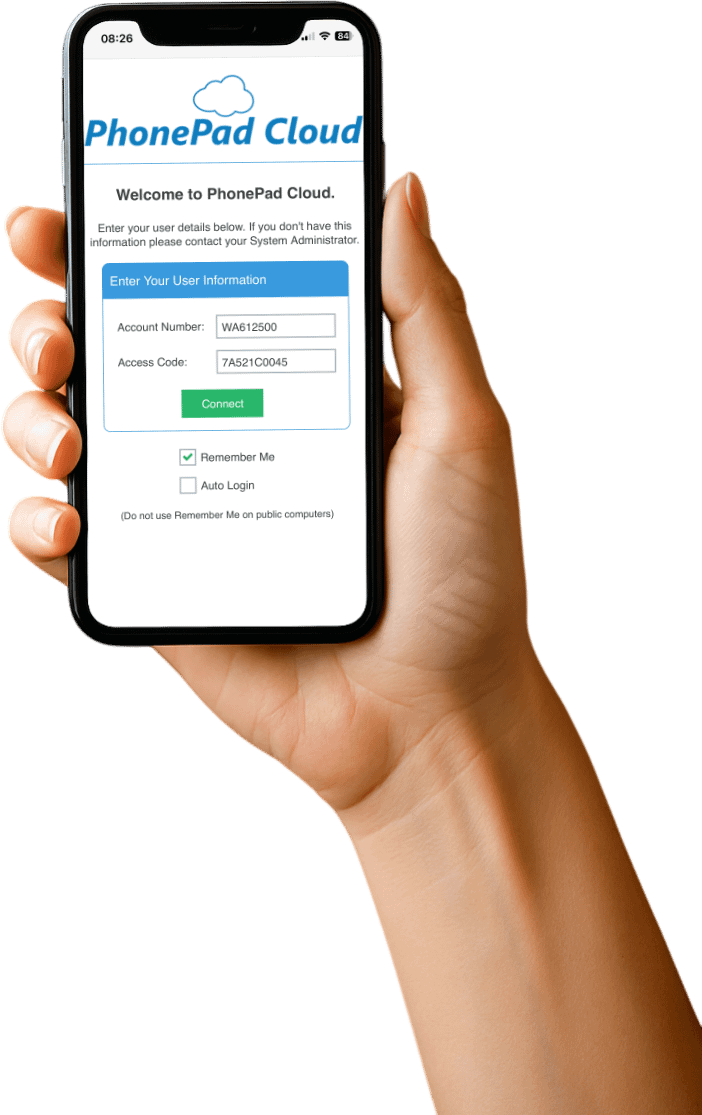
Well, first you login to your PhonePad Cloud account using the login credentials you set up in PhonePad.

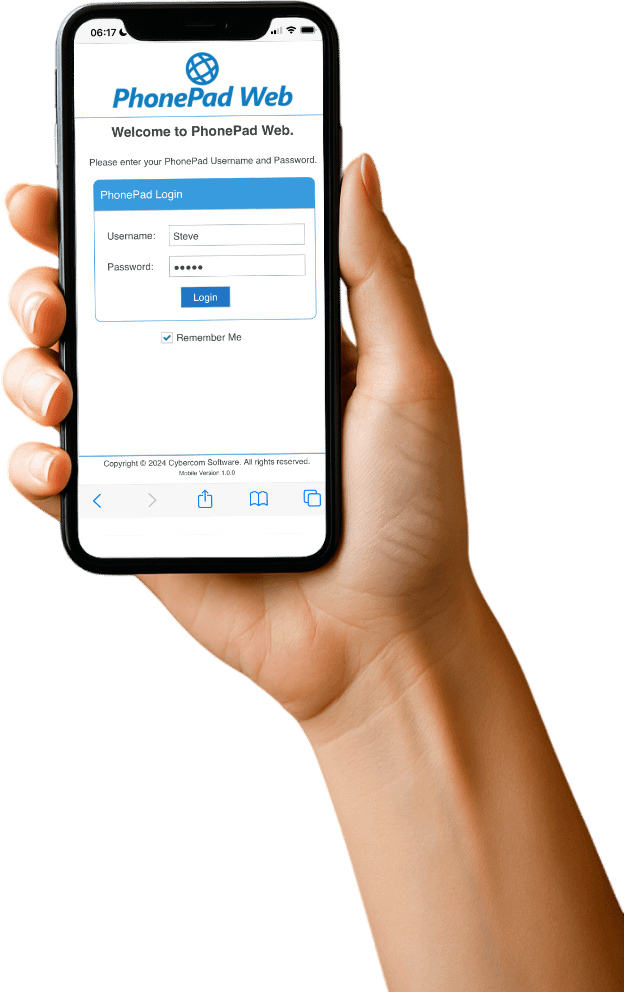
You are then automagically connected to PhonePad Server on your network. You then login using your usual PhonePad username and password, just as you normally would if you were in the office logging in to PhonePad.

Is It Secure?

Absolutely.

You control who has access through your PhonePad Cloud account.

And here’s the really cool thing. Your data is not stored on a cloud server somewhere where who knows who has access to it. Nope, your data stays where it belongs – safe and secure on your PhonePad Server in your office.

Who Is PhonePad Web For?

  • Ideal for staff in the field.
  • Remote workers.
  • Staff on the go.
  • Teams that want quick, hassle-free access to their phone messages.

In short: Anyone who needs easy, reliable, real-time access to their phone messages from anywhere.

There’s More to Come

Oh boy, we have so much planned for PhonePad Web. Lots of new features are coming your way.

We’ve put a lot of time and effort in creating PhonePad Web for you. We truly hope you like it.

If you have any suggestions for improvements, please let us know. And of course, if you experience any issues then contact us as a matter of priority.

Ready to Get Started?

There is a 60-day free trial available, just like our other products. So take PhonePad Web for a spin today.

Click here for more information on PhonePad Web.

Click here for steps on how to set it up.

Experience the freedom of PhonePad – anywhere you go.

PhonePad Version 5.87.0 Has Been Released.

We are excited to announce the release of PhonePad 5.87.0.

The biggest part of this release is the new features for your new PhonePad Web software. Please see separate blog article for more information.

Changes in This Release

  • NEW: PhonePad Web features.
  • NEW: When viewing a message, you can now move it to a folder by clicking the new Move button.
  • NEW: Added Windows Notifications (if supported) option under Preferences.
  • FIXED: Sender not appearing in message list columns for folders.
  • Minor fixes and improvements.

Important Information About MessageSender

This release is only compatible with MessageSender Version 6.25.0 or later.  If you don’t use MessageSender then you don’t need to worry about this.

Problems?

We’re human too.  We haven’t been replaced by some algorithm – yet. And we’re definitely not perfect.  Like most other humans, we can make mistakes.  So chances are you may come across something that’s not quite working right.  If you do find an error or a bug, please let us know and we’ll fix it as quickly as possible.

Installation Information

Please note: Server Updates must be installed on your Server or Host PC, not your workstation (unless your workstation is also the Host PC) -they cannot be installed directly on your workstations.  Make sure all users are logged out of PhonePad as the PhonePad Server will be stopped during the update and then restarted once it has completed.  Workstations will be automatically updated when PhonePad 5 Workstation is started on each workstation. Important: When downloading and installing an update from your My PhonePad account, make sure it’s actually the update and not the server setup program.

How Updates Work

Please read: You do not need to install every update between this one and the last update you installed.  PhonePad uses a smart update system that compares your current PhonePad system with what’s in the update, works out what changes are required, and then makes those changes.  So if you are a few versions behind don’t worry.  You can skip all of the updates in between and go straight to this update.

Updates and Anti-Virus Software

Depending on the anti-virus software you use, when you install a Server Update your AV software may class the updated software as a different program due to the change in binary signature.  If you experience speed or freezing issues after an update, you may need to reconfigure your AV software to stop real-time scanning of PhonePad.  This may need to be done on the both your Server or Host PC, and your workstations.

Digital Signatures

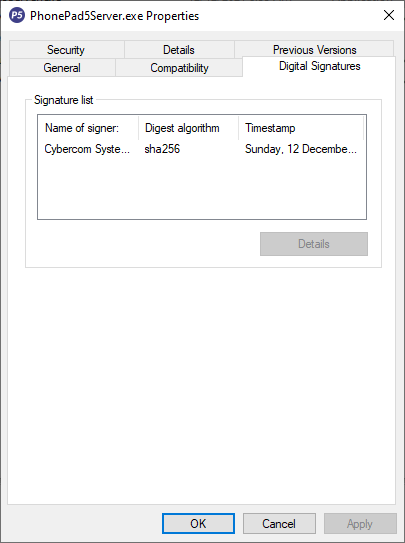
All PhonePad executables and DLLs are digitally signed for your protection.

You can confirm that a file is safe by right-clicking on it and selecting Properties from the popup menu, and then selecting the Digital Signatures tab.

Downloading the Update

You can download the update from your My PhonePad account.

If you are a current trial user you can download the update by logging in to My PhonePad Trial using the email address you used to start your trial.

Please contact Support if you have any problems or questions.

Installing Updates

If you’re unsure of how to install updates, please watch the video on this blog post.

You will need to have a current Update Plan to install this update.  If your Update Plan has expired, you will need to renew it before you can install this update.

Update Installation Service

If you would rather have the Server Update installed for you, you can arrange for us to remote connect and install it.  The cost is $45 and you can schedule a date and time here: https://www.cybercom-software.com/remote-server-update-assistance.htm .

An Inevitable Price Increase.

A Heads-Up: Update Plan & Product Price Changes Starting Tomorrow

We wanted to take a moment to let you know that starting tomorrow, there will be a small increase in the price of our Update Plans and all PhonePad products.

This wasn’t an easy decision to make—but it’s one we’ve thought about carefully, and we want to be upfront with you about why it’s happening.

Why Are Prices Changing?

Over the years, we’ve worked hard to keep our pricing fair and consistent. In fact, many of our products and services have stayed the same price for a long time (over 15 years). But as you probably know all too well, the cost of running a business—especially one that supports and develops software full-time—has gone up across the board.

This price adjustment helps us:

  • Continue improving PhonePad with new features and updates.
  • Keep providing fast, personal, and human customer support.
  • Invest in new tools and resources to develop amazing new features that will further increase productivity and save you time.

What’s Changing?

Here’s a quick summary:

  • All Update Plans will see a modest price increase.
  • All PhonePad licenses and upgrades will also be going up in line with increased costs.

These changes will go into effect starting tomorrow, so today is your last chance to lock in the current pricing if you’ve been thinking about renewing your Update Plan or grabbing an extra license.

We’re Still All About Value ❤️

Even with the new pricing, we’re committed to keeping PhonePad affordable, straightforward, and 100% focused on small businesses. No subscriptions, no confusing pricing tiers—just solid software backed by people who care.

We believe that PhonePad still represents great value, and we will continue to build on that value.

We appreciate your support more than you know. Many of you have been with us for many years (even decades!) and we couldn’t be more grateful for your trust.

If you have any questions or need help renewing your plan or purchasing, please don’t hesitate to get in touch. We’re always happy to help.

Exciting New Features Coming to PhonePad!

Big Things Are Coming to PhonePad!

We’ve been hard at work behind the scenes, and we’re super excited to share a sneak peek at what’s coming in the next big update of PhonePad. 🎉 If you love having more control over how things work and look in your software, you’re going to love this one.

log phone callsWe’re bringing more customization options than ever before — because let’s be honest, no two offices are exactly the same, and we want PhonePad to work the way you want it to.

Make It Yours

One of the most requested features is finally arriving: enhanced customization. You’ll be able to tailor the message to better suit your type of business and its specific needs.

Soon, you’ll be able to set it up just the way you like it.

Exclusively for Update Plan Holders

Here’s the important bit: these powerful new features will be available only to customers with a current Update Plan. Why? Because our Update Plan helps us keep developing, improving, and supporting PhonePad — and this update is one of the biggest we’ve rolled out in a while.

So if your plan is current, you’re all set! You’ll get these features the moment they’re released – for free.

If your plan has lapsed, now is the perfect time to renew. Not only will you get access to these new tools, but you’ll also stay covered for future updates, improvements, and support.

More to Come

This is just the beginning. We’re constantly listening to your feedback, and these customizations are the first step toward making PhonePad even more flexible and powerful.

We are being purposely vague because we don’t want to give too much away – yet.  There are some other exciting features that involve cell/mobile phones too.

Stay tuned for a release announcement soon — and if you haven’t already, make sure your Update Plan is active so you don’t miss out.

Don’t forget, the Update Plan renewal fee increases to 40% on April 15, 2025.

Thanks for being part of the PhonePad family — we can’t wait to show you what’s next!

Is PhonePad Legit?

Is PhonePad Legit? Absolutely – Here’s Why You Can Trust Us

We get it – when you’re searching for software to help manage your business, especially something as important as phone messages, you want to be sure it’s the real deal. With so many tools out there, it’s totally normal to ask: Is PhonePad legit?

The short answer? Yes, 100%. But let’s dig into the why.

We’ve Been Around a While

PhonePad isn’t some overnight pop-up software. It’s been helping businesses stay on top of their phone messages for almost three decades. Yup – 29+ years of real-world use, steady updates, and improvements based on what actual users need.

We’ve built PhonePad from the ground up with one goal in mind: making call management simpler and more efficient for busy offices. And we’ve stuck to that mission every step of the way.

Trusted by Thousands

PhonePad is used by organizations of all sizes – from solo business owners to busy teams in medical offices, schools, law firms, and more. Many of our customers have been with us for many years (some even since the very beginning!). That kind of loyalty doesn’t happen unless you’re doing something right.

Check out our awards, reviews and site security.

The ultimate call management system
PhonePad call logging
phone message pad
Call Management System

Support You Can Count On

Another reason people stick with us? Our support team is top-notch. When you reach out, you’re talking to a real person who genuinely wants to help – not a bot or a black hole inbox. We’re proud of the relationships we’ve built with our customers, and we’re always just a message away when you need us.

phone message padNo Gimmicks, No Nonsense

There’s no sketchy fine print, no bait-and-switch pricing, and no surprise ads in PhonePad. You download it, install it, and it just works. That’s it.

If We Were Dodgy, Would We Do This?

Let’s be real – if we weren’t legit, we definitely wouldn’t offer a free, no-strings-attached trial. We don’t believe in making you pay upfront and then cross your fingers hoping we’ll honor some vague refund policy. Nope.

With PhonePad, you can try it out firstno commitment, no credit card, no pressure. Just download it, install it, and see what you think. Take your time exploring the features, and decide for yourself if it’s the right fit for your business.

We’re confident you’ll love how easy and useful it is. But if it’s not for you? No hard feelings. We’d rather you be happy and informed than locked into something that doesn’t work for your needs.

Still Not Sure? Try It Out

If you’re still on the fence, no worries. The best way to know if PhonePad is right for you is to give it a go. Our free trial lets you explore all the features without any pressure – and no credit card needed.

Final Thoughts

So yes, PhonePad is 100% legit. We’ve got the history, the happy customers, and the human support to prove it. Whether you’re tired of sticky notes or just want a better way to keep track of messages, we’re here to help.

Have questions? Feel free to reach out– we’re always happy to chat.

What is MessageAlert?

One super handy feature in PhonePad is that you can access other users’ Inboxes. It’s a real lifesaver when someone’s out of the office and you need to check their messages.

But let’s be honest—keeping track of all those new messages can get tricky.

That’s where MessageAlert comes in!

It quietly runs in your system tray (down by the clock) and keeps an eye on all the Inboxes you’ve chosen to monitor. If there’s a new message, it’ll let you know right away—no more guessing or constantly checking.

See a username pop up? Just click it, and boom—you’re in that user’s Inbox.

Getting Started with MessageAlert

To launch it, just head to the Tools menu in PhonePad and click MessageAlert. It’ll minimize itself to the system tray so it stays out of your way but keeps working in the background.

Need to tweak the settings? Just right-click the icon and select Settings from the menu. There, you can choose which users you want to get alerts for.

Want It to Run Automatically?

If you’d like MessageAlert to start up automatically when PhonePad does, go to the View menu, select Preferences, then MessageAlert, and check the Start when PhonePad starts box.

That’s it! With MessageAlert, staying on top of messages—yours and your coworkers’—just got a whole lot easier.

We’re Here for You: Our Commitment to Customer Support.

We’ve Got Your Back – Every Step of the Way

We get it—great software is only part of the equation. What really makes the difference is knowing someone’s there when you need help.

That’s why support isn’t just something we offer—it’s something we live by. Case in point: your IT support service probably charges you for support – no pay, no support. We offer free support for our software, because we’re not just in it for the money. We genuinely want to help you.

Got a Problem? Let’s Fix It

When something goes wrong, we know it’s not just annoying—it can slow your day down, throw off your workflow, and just generally make things harder than they need to be. That’s why we treat every issue like it matters (because it does). Whether it’s a setup question, a weird glitch, or just “how do I…?”, we’re here to help.

Talk to a Human

When you contact us, you won’t get stuck in a loop of robotic replies or vague FAQ links. You’ll talk to a real person who actually listens and knows how to help. Our support team is made up of friendly, experienced folks who want to get things sorted for you—fast.

Quick, Clear Answers

We know your time’s important. That’s why we aim to get back to you quickly with real solutions that actually make sense. Our goal? Get you back on track with as little downtime (and frustration) as possible.

More Than Just Support

To us, support isn’t just about solving problems—it’s about building trust. A lot of our customers have been with us for many, many years, and we think that’s because they know we’re in it for the long haul. We’re here to help, sure—but we also want you to feel supported, appreciated, and confident in what you’re using.

We’re Always Listening

We know we’re not perfect—but we’re always trying to get better. Your feedback helps us do that. So if something’s not working the way it should, or there’s something we could improve, please tell us. We’re all ears.

Reach Out Anytime

Need help? Just drop us a message—email, live chat, support ticket, whatever works for you. We’re here, ready to jump in when you need us. Because when you succeed, so do we.

Thanks for choosing us. We’re with you all the way.

PhonePad Version 5.86.4 Has Been Released.

We are pleased to announce the release of PhonePad 5.86.4.

Changes in This Release

  • NEW: Appointment Calendar: Print outs can now be exported to PDF.
  • NEW: The Message Title of each message can be individually changed.
  • IMPROVED: If PhonePad is started when an instance of PhonePad is already running, the existing instance of PhonePad will be displayed. This has also been implemented for other applications such as ControlBar, Appointment Calendar, etc.
  • IMPROVED: Message list search – you no longer need to clear a search before starting another.
  • IMPROVED: Implemented a new automated re-connection management system to re-establish lost connections and sessions.
  • CHANGED: Database engine updated to Version 2.38 Build 2.
  • CHANGED: To avoid confusion, all applications how have the same version number.
  • FIXED: On the Admin Welcome screen, email sending wasn’t working due to an authentication issue.
  • Minor fixes and improvements.

Automated Re-Connection Management System

This system within PhonePad and its associated applications is designed to reconnect to the PhonePad Server should the connection or session be dropped or lost.  This can happen due to a large number of reasons, such as faulty network cables, network interface cards, wireless interference, etc.

If the system works correctly, you shouldn’t even notice it as everything is handled in the background.  The functionality has been extensively tested and has performed brilliantly.  However, if you have any issues with the system please let us know as soon as possible so that we can investigate and fix it.

Important Information About MessageSender

This release is only compatible with MessageSender Version 6.25.0 or later.  If you don’t use MessageSender then you don’t need to worry about this.

Problems?

We’re human too.  We haven’t been replaced by some algorithm – yet. And we’re definitely not perfect.  Like most other humans, we can make mistakes.  So chances are you may come across something that’s not quite working right.  If you do find an error or a bug, please let us know and we’ll fix it as quickly as possible.

Installation Information

Please note: Server Updates must be installed on your Server or Host PC, not your workstation (unless your workstation is also the Host PC) – they cannot be installed directly on your workstations.  Make sure all users are logged out of PhonePad as the PhonePad Server will be stopped during the update and then restarted once it has completed.  Workstations will be automatically updated when PhonePad 5 Workstation is started on each workstation. Important: When downloading and installing an update from your My PhonePad account, make sure it’s actually the update and not the server setup program.

How Updates Work

Please read: You do not need to install every update between this one and the last update you installed.  PhonePad uses a smart update system that compares your current PhonePad system with what’s in the update, works out what changes are required, and then makes those changes.  So if you are a few versions behind don’t worry.  You can skip all of the updates in between and go straight to this update.

Updates and Anti-Virus Software

Depending on the anti-virus software you use, when you install a Server Update your AV software may class the updated software as a different program due to the change in binary signature.  If you experience speed or freezing issues after an update, you may need to reconfigure your AV software to stop real-time scanning of PhonePad.  This may need to be done on the both your Server or Host PC, and your workstations.

Digital Signatures

All PhonePad executables and DLLs are digitally signed for your protection.

You can confirm that a file is safe by right-clicking on it and selecting Properties from the popup menu, and then selecting the Digital Signatures tab.

Downloading the Update

You can download the update from your My PhonePad account.

If you are a current trial user you can download the update by logging in to My PhonePad Trial using the email address you used to start your trial.

Please contact Support if you have any problems or questions.

Installing Updates

If you’re unsure of how to install updates, please watch the video on this blog post.

You will need to have a current Update Plan to install this update.  If your Update Plan has expired, you will need to renew it before you can install this update.

Update Installation Service

If you would rather have the Server Update installed for you, you can arrange for us to remote connect and install it.  The cost is $37 and you can schedule a date and time here: https://www.cybercom-software.com/remote-server-update-assistance.htm .