Manage your phone messages quickly and easily with PhonePad!

The Thing Is… Your Office Deserves Better…

Remember Thing from the Addams Family? The loyal disembodied hand that always seemed to crawl in at just the right (or wrong) moment. We wondered: What if Thing were still delivering messages in the modern office?Thing holding a message.

The result? A creepy hand popping out of a wooden box, waving a message like it’s 1965. Funny on screen — but in real life, it’s a productivity horror story.

Death by Post-it

If your office communication system still relies on:

  • Sticky notes that mysteriously vanish into the Bermuda Triangle of desks,
  • Handwritten phone messages that look like hieroglyphics written during an earthquake,

…it’s only a matter of time before an important client call gets buried under a coffee cup.

Lost in the Sticky Note Void

Old-school systems aren’t just inefficient — they’re a black hole for information. Time, money, and opportunities all disappear faster than a Post-it stuck to the bottom of someone’s shoe.

If you’ve ever asked, “Did anyone take a message for me?” and gotten only blank stares, you know exactly what we mean.

From Creepy to Clever: Meet PhonePad

This is where the joke stops and the solution steps in. PhonePad is modern message management software designed to drag your office communication out of the crypt and into the 21st century.

With PhonePad, you can:

  • Instantly record and share phone messages,
  • Assign and track tasks (without Post-it warfare),
  • Use a built-in Appointment Calendar,
  • Keep your team connected without playing “Who stole my sticky note?”

No stickies. No guesswork. No missing calls. Just clarity and productivity.

Why Even Thing Would Approve

Thing was always ahead of his time. If he had access to PhonePad, he wouldn’t be sneaking around with scraps of paper. He’d be scheduling Gomez’s meetings, sending Morticia polite reminders, and maybe even organizing Cousin Itt’s calendar (hair appointments alone could take weeks).

If PhonePad can tame Addams Family chaos, imagine what it could do for your office.Thing from Addams Family

The Thing Is… You Need to Try It

Sticky notes belong in history museums, right next to floppy disks and rotary phones.

Download Your Free Trial of PhonePad

Because in the modern office, even Thing would agree: there’s a better way to deliver messages.

PhonePad Version 5.89.0 Has Been Released.

We are happy to announce the release of PhonePad 5.89.0.

New Update Service

A new service has been added to Control Center. The Update service ensures that the Public IP Address for PhonePad Remote and PhonePad Web. If you either of these features then it’s recommended you install and start the Update service.

Changes in This Release

  • NEW: Update Service manages Public IP Address for PhonePad Remote and PhonePad Web – install using Control Center on the Server.
  • NEW: When the follow up for a message is marked as completed, an optional notification is sent to the user that sent the original message.
  • NEW: Memos can be sent for appointments in Appointment Calendar.
  • IMPROVED: Performance has been improved using multi-threading technology.
  • IMPROVED: WorkstationConfig now enables selectable log levels.
  • CHANGED: Trial period for all applications has been changed from 60 days to 30 days.
  • FIXED: Selecting different users in the To dialog does not override the original recipients — pre-addressed messages were still being sent to the users they were initially addressed to.
  • FIXED: When exporting the Address Book, the columns were not being listed for selection.
  • Minor fixes and improvements.

Important Information About MessageSender

This release is only compatible with MessageSender Version 6.26.0 or later.  If you don’t use MessageSender then you don’t need to worry about this.

Problems?

We’re human too.  We haven’t been replaced by some algorithm – yet. And we’re definitely not perfect.  Like most other humans, we can make mistakes.  So chances are you may come across something that’s not quite working right.  If you do find an error or a bug, please let us know and we’ll fix it as quickly as possible.

Installation Information

Please note: Server Updates must be installed on your Server or Host PC, not your workstation (unless your workstation is also the Host PC) – they cannot be installed directly on your workstations.  Make sure all users are logged out of PhonePad as the PhonePad Server will be stopped during the update and then restarted once it has completed.  Workstations will be automatically updated when PhonePad 5 Workstation is started on each workstation. Important: When downloading and installing an update from your My PhonePad account, make sure it’s actually the update and not the server setup program.

How Updates Work

Please read: You do not need to install every update between this one and the last update you installed.  PhonePad uses a smart update system that compares your current PhonePad system with what’s in the update, works out what changes are required, and then makes those changes.  So if you are a few versions behind don’t worry.  You can skip all of the updates in between and go straight to this update.

Updates and Anti-Virus Software

Depending on the anti-virus software you use, when you install a Server Update your AV software may class the updated software as a different program due to the change in binary signature.  If you experience speed or freezing issues after an update, you may need to reconfigure your AV software to stop real-time scanning of PhonePad.  This may need to be done on the both your Server or Host PC, and your workstations.

Digital Signatures

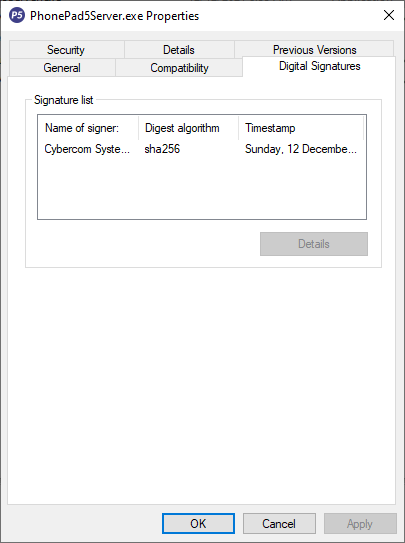
All PhonePad executables and DLLs are digitally signed for your protection.

You can confirm that a file is safe by right-clicking on it and selecting Properties from the popup menu, and then selecting the Digital Signatures tab.

Downloading the Update

You can download the update from your My PhonePad account.

If you are a current trial user you can download the update by logging in to My PhonePad Trial using the email address you used to start your trial.

Please contact Support if you have any problems or questions.

Installing Updates

If you’re unsure of how to install updates, please watch the video on this blog post.

You will need to have a current PhonePad Care Plan to install this update.  If your Care Plan has expired, you will need to renew it before you can install this update.

Update Installation Service

If you would rather have the Server Update installed for you, you can arrange for us to remote connect and install it.  The cost is $45 and you can schedule a date and time here: https://www.cybercom-software.com/remote-server-update-assistance.htm .

The Day I Realized Sticky Notes Were Slowly Killing My Business

It was 7:46 p.m. on a Thursday when I saw it.

A small yellow sticky note — half-crumpled, smeared with coffee — lying next to the phone.

On it, in shaky handwriting: “Call Mr. Williams back. URGENT.”

Flustered receptionist surrounded by sticky notes.No date. No context. No callback number.

And just like that… another client relationship slipped through our fingers.

I’d been telling myself for months that our phone message chaos was “manageable.”

But at that moment, staring at that useless sticky note, I realized something chilling:

We weren’t just losing messages. We were losing money.

The Hidden Cost of “Just Take a Message”

If you run an office — especially in law, medical, or financial services — you already know the drill:

  • Staff scribbling phone messages on pads or Post-its.
  • Clients calling back angry because “no one got back to them.
  • You piecing together voicemails, emails, and scraps of paper like some kind of detective.

It’s exhausting. It’s embarrassing.

PhonePad will revolutionize your phone call management.And it makes you wonder: “How many opportunities have we lost that we don’t even know about?”

The Hero That Saved My Sanity

This is where things changed.

A colleague mentioned this little piece of software they were using called PhonePad.

At first, I brushed it off — “Another app? Great, one more login to forget.”

But here’s the thing: PhonePad wasn’t just another app.

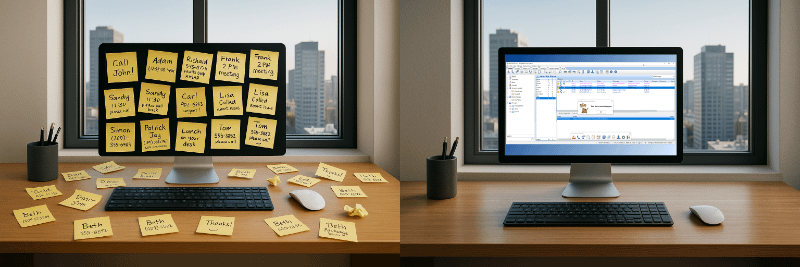
PhonePad replaces sticky notes.It was a hero mechanism that solved my entire phone message problem in one move:

It turns every phone call into an organized, trackable, sharable digital message — instantly.

No scraps of paper. No forgotten callbacks.

And — this blew my mind — it works across the whole team. Everyone sees what’s going on.

Why It Just Makes Sense

The more I thought about it, the more obvious it became:

  • Every phone message is logged. No more “he said, she said.”
  • Every team member knows what’s pending. No more guessing if someone followed up.
  • Every call becomes a record. Which, let’s face it, is priceless if you ever need proof.

When I saw that it also integrates beautifully with other office tools and takes about 10 minutes to set up, it wasn’t a question of “Should I try this?”

It was: “Why didn’t I do this sooner?”

If You’ve Been There, You Know

You know that sinking feeling when a client says, “I left a message two days ago and no one got back to me”?

Or when you find out a team member forgot to pass along an urgent call?

Yeah. That’s the stuff that keeps you awake at night.

With PhonePad, that knot-in-your-stomach feeling? Gone.

Sticky notes driving you mad? You need PhonePad.Real People. Real Results.

“We have enjoyed our experience with PhonePad; it has allowed my business to grow faster due to not losing messages and having “repeat callers”. Before PhonePad, we used to use a Word Document and before that paper phone messages that would have a lag time between when the message was written, and when the intended recipient would read it. The delay would sometimes be hours or days and therefore we would have upset “repeat callers” who might have already called 2 or 3 times more by the time the message was written which would cause chaos. In addition, only one person could use the Word Document at a time which meant that unsaved Word documents or scratch paper would have to be used resulting in lost messages. PhonePad eliminated all of these issues and allowed me and all of my employees to see any messages at any time with no restrictions..”
Bernie C. CEO, Accounting Firm.

“Really like everything about PhonePad. And recommending it to others.”
Marie J. Office Manager and Paralegal, Law Firm.

“We have been using PhonePad for our business, and it has proven to be an absolute game-changer in keeping us organized and on top of our incoming phone messages. The software’s user-friendly interface and intuitive design make it a standout choice for efficiently managing a high volume of messages.

One of the standout features that we absolutely love is the ability to make detailed notes on messages. This has greatly improved our communication and collaboration within the team. PhonePad’s organizational prowess is evident in its capability to categorize and prioritize messages, ensuring that no crucial information is overlooked. This has streamlined our workflow and significantly boosted productivity.

The task management features offered by PhonePad are another highlight. Being able to create and track tasks associated with specific messages has enhanced our team’s accountability and provided a systematic approach to handling follow-ups and action items. The option to check off completed tasks provides a tangible sense of progress, contributing to a more organized and focused work environment.

One particular advantage that sets PhonePad apart is the ability to have a listing of messages directly on the computer. This eliminates the need for small pink phone slips that are easily lost or misplaced, along with the valuable information they contain. This digital approach has proven to be a much more reliable and efficient way to manage our messages.

In conclusion, PhonePad has been an invaluable asset to our business, providing a comprehensive solution for managing phone messages with efficiency and precision. Whether it’s the note-taking capabilities, organizational features, task management tools, or the convenience of a digital message listing, PhonePad excels in every aspect. We highly recommend it to businesses seeking a reliable and powerful tool to stay organized and enhance communication.
– Wendy J., Vice-President, Consumer Services.

PhonePad makes your office life stress free.Who It’s For (And Who It’s Not For)

PhonePad is for:

  • Offices where missing messages costs money or credibility.
  • Teams that need accountability and better communication.
  • Business owners who don’t want to babysit their phones.

It’s NOT for:

  • Hobby businesses with one or two calls a week.
  • Anyone who thinks sticky notes are “good enough.”

The Problem vs. The Solution

The Problem: Messy, unreliable phone message handling that’s costing you time, clients, and reputation.

The Solution: PhonePad. A central, simple, and rock-solid system for managing every phone call like a pro.

How It Works

  1. Install PhonePad (takes minutes, not hours).
  2. Set up your team. Each person gets their own login.
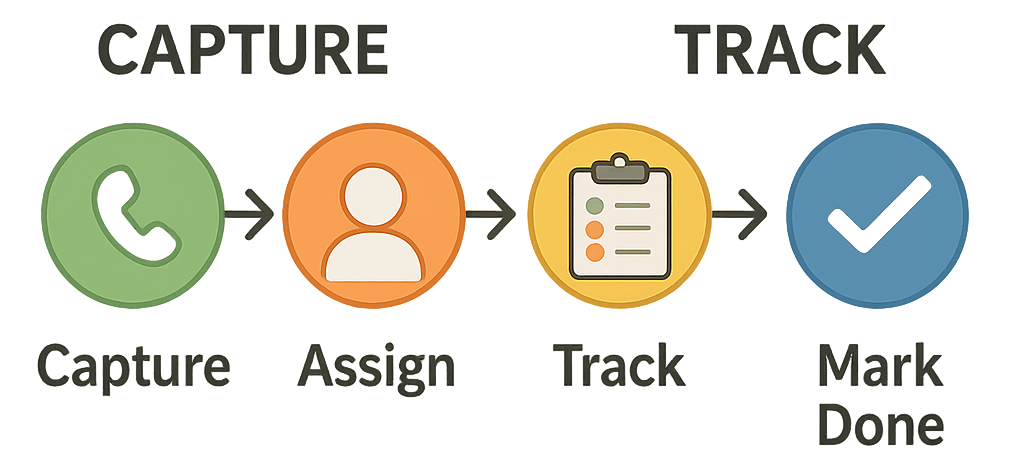
  3. Watch the magic happen. Every call gets captured, assigned, and tracked — no more lost messages.

Track every phone call with PhonePad.What’s In It For You?

  • Peace of mind. Every call is handled.
  • Professionalism. Clients notice when nothing falls through the cracks.
  • Time back. You stop chasing scraps of paper and start focusing on your work.

PhonePad will revolutionize your phone call management.Here’s the Best Part:

You don’t need to imagine what this would feel like.

You can try it free for 30 days. No credit card. No risk. Just less chaos.

Click here to try PhonePad now

Because your business deserves more than sticky notes.


PhonePad Version 5.88.0 Has Been Released.

We are happy to announce the release of PhonePad 5.88.0.

Changes in This Release

  • NEW: User Management now has a feature that allows you to reassign all messages from one user to another user. Ideal for when a staff member leaves.
  • NEW: WebServer has been added to Service Monitor and Service Watch.
  • CHANGED: Trial period for all applications has been changed from 60 days to 30 days.
  • FIXED: Appointment Calendar doesn’t remember which users are checked and unchecked between sessions.
  • FIXED: Sent messages announcement works for phone messages but not memos.
  • Minor fixes and improvements.

Important Information About MessageSender

This release is only compatible with MessageSender Version 6.26.0 or later.  If you don’t use MessageSender then you don’t need to worry about this.

Problems?

We’re human too.  We haven’t been replaced by some algorithm – yet. And we’re definitely not perfect.  Like most other humans, we can make mistakes.  So chances are you may come across something that’s not quite working right.  If you do find an error or a bug, please let us know and we’ll fix it as quickly as possible.

Installation Information

Please note: Server Updates must be installed on your Server or Host PC, not your workstation (unless your workstation is also the Host PC) – they cannot be installed directly on your workstations.  Make sure all users are logged out of PhonePad as the PhonePad Server will be stopped during the update and then restarted once it has completed.  Workstations will be automatically updated when PhonePad 5 Workstation is started on each workstation. Important: When downloading and installing an update from your My PhonePad account, make sure it’s actually the update and not the server setup program.

How Updates Work

Please read: You do not need to install every update between this one and the last update you installed.  PhonePad uses a smart update system that compares your current PhonePad system with what’s in the update, works out what changes are required, and then makes those changes.  So if you are a few versions behind don’t worry.  You can skip all of the updates in between and go straight to this update.

Updates and Anti-Virus Software

Depending on the anti-virus software you use, when you install a Server Update your AV software may class the updated software as a different program due to the change in binary signature.  If you experience speed or freezing issues after an update, you may need to reconfigure your AV software to stop real-time scanning of PhonePad.  This may need to be done on the both your Server or Host PC, and your workstations.

Digital Signatures

All PhonePad executables and DLLs are digitally signed for your protection.

You can confirm that a file is safe by right-clicking on it and selecting Properties from the popup menu, and then selecting the Digital Signatures tab.

Downloading the Update

You can download the update from your My PhonePad account.

If you are a current trial user you can download the update by logging in to My PhonePad Trial using the email address you used to start your trial.

Please contact Support if you have any problems or questions.

Installing Updates

If you’re unsure of how to install updates, please watch the video on this blog post.

You will need to have a current PhonePad Care Plan to install this update.  If your Care Plan has expired, you will need to renew it before you can install this update.

Update Installation Service

If you would rather have the Server Update installed for you, you can arrange for us to remote connect and install it.  The cost is $45 and you can schedule a date and time here: https://www.cybercom-software.com/remote-server-update-assistance.htm .

How PhonePad Simplifies Office Communication (Without the Chaos).

Office communication can get messy.

One person’s writing is hard to read. Sticky notes disappear. Emails get lost in the abyss of inboxes. And when a message doesn’t get delivered? Suddenly it’s your fault.

If this sounds familiar, you’re not alone.

That’s why we built PhonePad—a simple, reliable tool that transforms how offices handle phone messages and internal communication. Whether you’re managing a small front desk or juggling a whole team, PhonePad helps keep everything organized.

No More “Did You Get My Message?”

With PhonePad, you’ll never wonder if a message was lost, forgotten, or Comical image of a woman yelling out in an office about a message.misunderstood.

Every message—whether it’s a call for a coworker or a note to yourself—is logged in a searchable, time-stamped inbox. You can track who sent it, who received it, and what action was taken.

Forget scribbled notes and verbal hand-offs. This is communication that actually sticks.

Messages That Work Like You Do

PhonePad lets you:

  • Instantly log incoming and outgoing phone calls.
  • Send messages directly to coworkers (or even groups).
  • Add follow-up notes, reminders, and due dates.
  • Mark messages as urgent, private, or completed.
  • Track message history to see what’s been done.

It’s like having a supercharged message pad—but digital, searchable, and built for busy offices.

Made for Teams That Juggle Tasks

Whether your team is in the office, working remotely, or a bit of both, PhonePad makes sure everyone stays in the loop.

  • Inbox access: Each staff member has their own inbox. And PhonePad can be configured so that users can access other Inboxes – perfect for executive assistants.
  • Group folders: Organize communication by department, project, or role.
  • Follow-up tracking: Know who followed up, and when.
  • Message receipts: Get notified when a message is read.

Need to check if a call was returned or passed on? It’s all right there—no guesswork required.

A cartoon image of a man juggling tasks.Organize Messages with Folders (and Filters)

PhonePad gives you more than just an inbox.

You can organize your messages into personal, public, or group folders, and filter them by:

  • Read/unread.
  • Follow-up status.
  • Date.
  • Sender.
  • Urgency.
  • Category.
  • And more.

And if you’re looking for something specific? Just use the built-in search bar to find any message in seconds.

Helpful Extras (That Make You Look Like a Rockstar)

  • Reminders – Never miss a callback again.
  • Instant Chat – Built-in internal messaging.
  • To-Do Lists – Assign and track tasks.
  • Caller History – See a timeline of interactions with any contact.
  • Appointment Calendar – (Optional add-on) for booking client or staff meetings.

An image of a young male office worker trying to play a computer keyboard like a guitar, clearly thinking he is a rock star.Say Goodbye to Communication Bottlenecks

When communication falls apart, it causes confusion, stress, and missed opportunities.

PhonePad fixes that by giving your team a centralized, easy-to-use system that keeps messages moving and nothing slipping through the cracks.

It’s better for your team. Better for your customers. And way better for your sanity.

Try PhonePad for Free

Want to see how it works in your office?

Try it free for 30 days—no credit card required.

Download Your Free 30-Day Trial

We Sent a Team In. They Haven’t Returned.

We thought we could get answers.

A small team of brave volunteers (armed only with clipboards and curiosity) crossed into the Restricted Zone earlier this week. Their mission: to find out what’s really going on behind those doors.

They haven’t been seen since.

There was a brief radio transmission—mostly static—followed by the words, “It’s… beautiful…” and then silence.

We’re not panicking.
Just… mildly alarmed.

In the meantime, we’ve intercepted some documents and captured a few blurry surveillance photos. We’re not saying this is definitely part of something huge and mysterious, but… actually, yes we are.

What Happens Next?

That’s classified.
But rest assured—we’re still monitoring the situation.
And we’ve sent in another team. This time with flashlights. And snacks.

More updates soon. If you don’t hear from us, assume the worst. Or the best.

More Information About the Upcoming PhonePad Care Plan.

What’s Changed: Understanding the New PhonePad Care Plan

The PhonePad Care Plan would take effect on July 1, 2025

If you’re wondering what it means for you — this post is for you.

The Care Plan isn’t just a new name — it represents a clearer, more consistent way for us to provide support, updates, and peace of mind to our users.

Below, we’ll walk you through what’s changed, what’s included, and why we made this shift.

What Is the Care Plan?

The PhonePad Care Plan replaces what we previously called the “Update Plan.” But it now includes more than just software updates.

Here’s what the Care Plan covers:

  • Free Major and Minor Updates
    You’ll get all updates at no extra cost — including major version upgrades (e.g. PhonePad 5 to 6) and minor fixes and enhancements.
  • Priority Email Support
    Your support requests go to the top of the queue. We aim to respond faster to help keep your system running smoothly.
  • Remote Support Assistance
    When needed, we can connect remotely to help troubleshoot or resolve issues — a big time saver for your business.

What If You’re Not on the Care Plan?

We understand that not everyone may need or want ongoing coverage — that’s okay too. But here’s how it works moving forward:

  • You won’t receive minor updates (these are often bug fixes, tweaks, and improvements).
  • Major updates will need to be purchased at full price.
  • Remote support won’t be free.  There will be a nominal charge.
  • Support requests may take longer to process (Care Plan subscribers receive priority).

You can still send us questions, report bugs, or make suggestions even without a Care Plan — we’re always happy to hear from our users.

Why the Change?

Over the years, we’ve offered updates and support in different ways — sometimes free, sometimes not, depending on the situation. This caused confusion about what’s included and what’s not.

The Care Plan simplifies all of that.

By moving to a clear, consistent annual plan, you’ll always know where you stand. And it helps us continue to improve PhonePad while delivering the level of support you deserve.

What About Existing Update Plans?

If you already have an active Update Plan, you will be automatically upgraded to the Care Plan — no need to do anything.  You’ll now receive all the additional benefits at no extra cost.

The Bottom Line

If you want to:

  • Stay up to date with the latest features and improvements.
  • Get faster support when you need it.
  • Save money on future upgrades…then the Care Plan is the way to go.

We’re here to support your business long-term — and the Care Plan is our commitment to doing just that.

If you have any questions about the new plan or what it means for you, don’t hesitate to get in touch.  We’re happy to help.

Top Secret. Eyes Only. Probably Illegal to Even Read This.

Something is happening.

We tried to sneak a peek, but a very serious gentleman in camo stopped us with a hand gesture so official we immediately forgot all our passwords and briefly questioned our citizenship.

There are warning signs everywhere.
“Authorized Personnel Only.”
“Restricted Area.”
“Photography Prohibited.”
We swear we even saw one that said, “Don’t Even Think About It.”

Whatever’s behind those doors is big.
Like “cue the dramatic music and slow zoom” big.
Like “somebody call Tom Cruise” big.

Is it alien tech?
A revolutionary new idea?
A perfectly optimized software experience wrapped in mystery and smuggled into a secure facility under the cover of night?

We couldn’t possibly say.
(Seriously, we signed something.)

But here’s what we can tell you:

The countdown has begun.
Something special is coming.
And it’s going to be worth the wait.

So stay alert. Keep your eyes peeled.
And if you hear a soft mechanical hum and see a faint glow coming from behind a locked door… do NOT approach. Just nod knowingly and walk away. Cool people don’t ask questions.

All will be revealed.
Eventually.
Probably.
Maybe.
(If the guards let us.)