Manage your phone messages quickly and easily with PhonePad!

PhonePad Version 5.11.0 Has Been Released.

We are pleased to announce the release of PhonePad 5.11.0 Server Update.

The main change in this release is the introduction of our new notification system.  A new notification server is built-in to the PhonePad 5 Server. Whenever there are new messages for a user the notification system will send a notification message to their workstation.

I’ll explain what this means.

Currently PhonePad polls the server for any new messages at a preset interval.  You can set how frequently PhonePad checks for new messages under Preferences, for example every 15 seconds.

With Version 5.11.0 this setting has been moved to System Rules so that an administrator can set the checking frequency for every workstation.  But along with this there’s also a new option: Dynamic Refresh.

When you select Dynamic Refresh, instead of polling the server for new messages at whatever interval you set, the server will use the notification system to update the Inbox message list whenever a message is sent to a particular user.  This means that message delivery is now virtually instantaneous.

Please note that the Dynamic Refresh functionality is still in Beta.  Although we have been testing it for a while, it is possible there may be some unfound issues.  The good news is you can use whichever method you prefer and you can switch methods any time you wish.

Changes and Fixes

  • ADDED – New internal notification system for message list refreshing provides instant response – BETA.
  • MOVED – Setting for message list refreshing has been moved from Preferences to System Rules so that it can be controlled centrally.
  • FIXED – When printing, although the Preview option worked fine, the Print option was not working unless preview was used first.
  • FIXED – When editing a message, the changes were not being propagated to other users.
  • FIXED – AutoBackups were not running when the default schedule was changed.
  • Various minor fixes.

Please note: Server Updates must be installed on your Server or Host PC, not your workstation (unless your workstation is also the Host PC) – they cannot be installed directly on your workstations.  Workstations will be automatically updated when PhonePad 5 Workstation is started on each workstation.

You can download the update from your My PhonePad account or by clicking here.

These updates are available for both fully licensed users and trial users.

Please contact Support if you have any problems or questions.

Downloading Updates from My PhonePad.

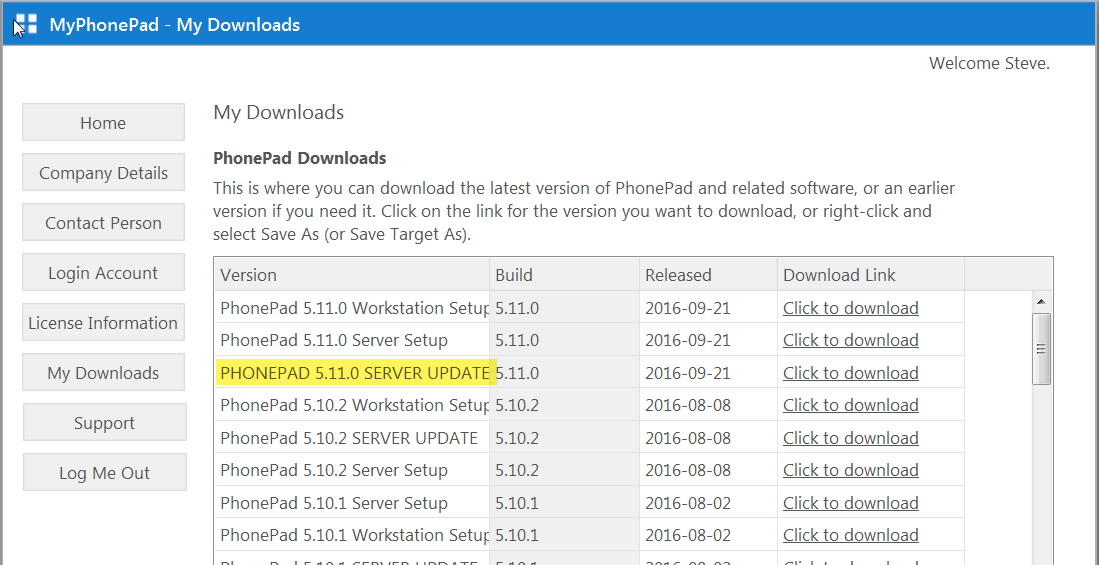
When you login to your My PhonePad Account to download updates, please make sure you download the correct file.

With each release there will be 3 files available: the workstation setup program, the server setup program, and the server update program.  The program you need to download for an update is the server update program.

The update program will appear in upper case, as can be seen in the screenshot below.  This is the file you should download.

Server Updates

Normally you wouldn’t need to download the other two files:

  • The workstation setup program is used to install PhonePad 5 Workstation on a new computer, or an existing computer that doesn’t already have PhonePad 5 Workstation installed.
  • The server setup program is used to install PhonePad 5 Server on a new Server or Host PC.  If you run this setup program on a Server or Host PC that already has PhonePad 5 Server installed, it will wipe your existing database, ie. it will delete all of your PhonePad 5 data.  Only use this setup program on a new Server or Host PC, or if you want to start with a clean slate (eg. after testing PhonePad 5).

If you have any questions please email support at supportATcybercom-softwareDOTCOM.


PhonePad Version 5.10.4 Has Been Released.

We are pleased to announce the release of PhonePad 5.10.4 Server Update.

Changes and Fixes

  • FIXED – On some systems the server startup procedures were not starting up correctly.
  • FIXED – Phone number and company details were being cleared from new phone messages when new callers were entered, even though the System Rule the “Clear Caller Details when new caller added” check box is not checked..
  • Various minor fixes.

Please note: Server Updates must be installed on your Server or Host PC, not your workstation (unless your workstation is also the Host PC) – they cannot be installed directly on your workstations.  Workstations will be automatically updated when PhonePad 5 Workstation is started on each workstation.

Important Information:  A new feature was added to PhonePad Version 5.10.3.  This has caused connection issues for some users but was not evident during the few days of pre-release testing that was performed.  In fact we are still unable to reproduce the issue here.  However, we investigated the issue as soon as we became aware of it, and we have discovered what is potentially causing the problem on some systems.  It has now been fixed.  If you have installed PhonePad 5.10.3 and are unable to connect to the server on your network please install this update as soon as possible.  We apologize for any inconvenience caused.

You can download the update from your My PhonePad account or by clicking here.

These updates are available for both fully licensed users and trial users.

Please contact Support if you have any problems or questions.

Server Connection Issues with PhonePad 5.

If you have updated to PhonePad Version 5.10.3 and are experiencing server connection issues (not all users are affected by this issue), we have located the source of the problem and are uploading 5.10.4, which fixes this.  As soon as the update is available we will post the update links on this blog.

PhonePad Version 5.10.3 Has Been Released.

We are pleased to announce the release of PhonePad 5.10.3 Server Update.

Changes and Fixes

  • FIXED – The setting that specified the number of days for automatic clearing of the Deleted folder was being ignored.
  • FIXED – When using the Add New Caller window to update caller details, the changes were not being saved.
  • FIXED – In some situations, the company and phone number fields were being populated with incorrect information.
  • IMPROVED – Server updates can now be initiated from workstations using the Application Update feature (administrators only).
  • ADDED – PhonePad administrators can now receive a notification by Email, SMS or Pushover when a new server update has been successfully installed.  Works with both manual and automatic updates.
  • ADDED – New option under Preferences to force new phone messages to display on top of main window (see Preferences/Messages-4).
  • Various minor fixes.

Please note: Server Updates must be installed on your Server or Host PC, not your workstation (unless your workstation is also the Host PC) – they cannot be installed directly on your workstations.Workstations will be automatically updated when PhonePad 5 Workstation is started on each workstation.

If you have PhonePad Version 5.5.0 or later you should be able to download and install this update via the Application Update feature.  If you have automatic updates enabled then the update should download and install for you automatically.

You can also download the updates from your My PhonePad account.

These updates are available for both fully licensed users and trial users.

Please contact Support if you have any problems or questions.
PhonePad Version 5.10.2 Has Been Released.

We are pleased to announce the release of PhonePad 5.10.2 Server Update.

Changes and Fixes

  • FIXED – An “Index out of bounds” error would sometimes occur when dragging and dropping messages to folders.
  • FIXED – Deleted messages reappearing in the Inbox or other folders (except the Deleted folder of course).
  • FIXED – PhonePad 5 Server automatically backs up important configuration files as an added precaution (in addition to your daily automatic backups).  If the auto-discovery system failed due to a system conflict, it would cause these backups to be performed every second instead of every 12 hours.
  • FIXED – In some situations the AutoBackup time would default to a specific time regardless of what you set it to.
  • ADDED – The configuration file backups can be disabled using Control Center.
  • ADDED – You can initiate a manual scan for multiple IP Addresses on your Server or Host PC in Control Center.
  • ADDED – Server Sessions feature shows all connected users.
  • Various minor fixes.

Deleting Messages

A small number of users have reported an issue with deleting messages.  They delete a message but when they refresh the message list the message reappears.  We believe we have located the cause of this issue and it has now been resolved.  If you still experience this problem and are get the resulting error message please let us know.

Please note: Server Updates must be installed on your Server or Host PC, not your workstation (unless your workstation is also the Host PC) – they cannot be installed directly on your workstations.

Workstations will be automatically updated when PhonePad 5 Workstation is started on each workstation.

If you have PhonePad Version 5.5.0 or later you should be able to download and install this update via the Application Update feature.  If you have automatic updates enabled then the update should download and install for you automatically.

You can also download the updates from your My PhonePad account.

These updates are available for both fully licensed users and trial users.

Please contact Support if you have any problems or questions.

PhonePad Version 5.10.1 Has Been Released.

We are pleased to announce the release of PhonePad 5.10.1 Server Update.

Changes and Fixes

  • FIXED – PhonePad was not remembering the state of the Username and Password Not Required checkbox under Communication Settings. It’s also recommended that you update to MessageSender 6.1.6 if you use Automatic Message Forwarding.
  • CHANGED – PhonePad Remote has been modified to use the new update system.
  • Various minor fixes.

Deleting Messages

A small number of users have reported an issue with deleting messages.  They delete a message but when they refresh the message list the message reappears.  We have been unable to reproduce this issue.  The code for deleting messages has not been changed for a few months so we’re a bit confused why this would suddenly start occurring for some users.  In an attempt to isolate the cause we have added some additional error handling.  If a message can’t be deleted you should see an error message.  If you experience this problem and get the resulting error message please let us know.

Please note: Server Updates must be installed on your Server or Host PC, not your workstation (unless your workstation is also the Host PC) – they cannot be installed directly on your workstations.

Workstations will be automatically updated when PhonePad 5 Workstation is started on each workstation.

If you have PhonePad Version 5.5.0 or later you should be able to download and install this update via the Application Update feature.  If you have automatic updates enabled then the update should download and install for you automatically.

You can also download the updates from your My PhonePad account.

These updates are available for both fully licensed users and trial users.

Please contact Support if you have any problems or questions.

PhonePad Version 5.10.0 Has Been Released.

We are pleased to announce the release of PhonePad 5.10.0 Server Update.

Changes and Fixes

  • CHANGED – The workstation update process has been improved and PhonePad now detects if a workstation has already been updated when a new update is available.
  • FIXED – Group Inboxes would only appear in the To: list of new messages when the Show Disabled User Accounts system rule was enabled.
  • FIXED – The Back At fields were not appearing in Quick Print.
  • FIXED – When the No Action Required label was customized,  it was still showing as No Action Required in print outs.
  • FIXED – The Back At checkbox was not selectable when message editing was enabled.
  • FIXED – A bug introduced in the previous release was causing problems with message forwarding in MessageSender.
  • Various minor fixes.

Deleting Messages

A small number of users have reported an issue with deleting messages.  They delete a message but when they refresh the message list the message reappears.  We have been unable to reproduce this issue.  The code for deleting messages has not been changed for a few months so we’re a bit confused why this would suddenly start occurring for some users.  In an attempt to isolate the cause we have added some additional error handling.  If a message can’t be deleted you should see an error message.  If you experience this problem and get the resulting error message please let us know.

Please note: Server Updates must be installed on your Server or Host PC, not your workstation (unless your workstation is also the Host PC) – they cannot be installed directly on your workstations.

Workstations will be automatically updated when PhonePad 5 Workstation is started on each workstation.

If you have PhonePad Version 5.5.0 or later you should be able to download and install this update via the Application Update feature.  If you have automatic updates enabled then the update should download and install for you automatically.

You can also download the updates from your My PhonePad account.

These updates are available for both fully licensed users and trial users.

Please contact Support if you have any problems or questions.

PhonePad Version 5.9.1 Update.

If you downloaded the 5.9.1 update yesterday then you may have had a problem updating your Server or Host PC. This was caused by an issue with our automated update system.  This has now been fixed so please download the update again.